Rabbitmq集群部署Haproxy
安装前的说明:
1、为了配合做rabbitmq的负载均衡,本次的安装包是安装的低版本1.5.8版本,下载包的地址:https://src.fedoraproject.org/repo/pkgs/haproxy/
2、按照上两篇博客,先把rabbitmq集群装好:
单机版Rabbitmq部署:https://blog.51cto.com/10950710/2135676
Rabbitmq集群部署:https://blog.51cto.com/10950710/2135717
安装步骤:
1、将haproxy-1.5.8.tar.gz上传到服务器/root下面并解压
[root@localhost haproxy-1.5.8]# pwd
/root/haproxy-1.5.8
[root@localhost haproxy-1.5.8]# ll
总用量 368
-rw-rw-r--.  1 root root 278375 10月 31 2014 CHANGELOG
drwxrwxr-x. 10 root root    127 10月 31 2014 contrib
drwxrwxr-x.  4 root root   4096 10月 31 2014 doc
drwxrwxr-x.  2 root root   4096 10月 31 2014 ebtree
drwxrwxr-x.  3 root root   4096 10月 31 2014 examples
drwxrwxr-x.  6 root root     60 10月 31 2014 include
-rw-rw-r--.  1 root root   2029 10月 31 2014 LICENSE
-rw-rw-r--.  1 root root  27752 10月 31 2014 Makefile
-rw-rw-r--.  1 root root  26322 10月 31 2014 README
-rw-rw-r--.  1 root root   4040 10月 31 2014 ROADMAP
drwxrwxr-x.  2 root root   4096 10月 31 2014 src
-rw-rw-r--.  1 root root     14 10月 31 2014 SUBVERS
drwxrwxr-x.  2 root root   4096 10月 31 2014 tests
-rw-rw-r--.  1 root root     24 10月 31 2014 VERDATE
-rw-rw-r--.  1 root root      6 10月 31 2014 VERSION
2、编译安装:
1)先查看本机系统版本
[root@localhost haproxy-1.5.8]# uname -r
3.10.0-693.el7.x86_64
[root@localhost haproxy-1.5.8]#
参数说明:
• TARGET=linux310,内核版本,使用uname -r查看内核,如:3.10.0-514.el7,此时该参数就为linux310;kernel 大于2.6.28的可以用:TARGET=linux2628;
• ARCH=x86_64,系统位数;
• PREFIX=/usr/local/haprpxy #/usr/local/haprpxy,为haprpxy安装路径。
2)编译安装
[root@localhost haproxy-1.5.8]# make TARGET=linux310 ARCH=x86_64 PREFIX=/usr/local/haproxy   #执行之前,确认已经安装了gcc,否则这一步骤会执行失败
[root@localhost haproxy-1.5.8]# make install PREFIX=/usr/local/haproxy
3、添加配置文件
该版本解压后文件内就没有haproxy.cfg文件,所以需要自己写。这个配置文件是按照搭建rabbitmq的负载均衡来配置的:
[root@localhost haproxy]# mkdir /etc/haproxy   #创建配置文件目录
[root@localhost haproxy]# cd /etc/haproxy
[root@localhost haproxy]# cat haproxy.cfg   (配置文件解析可以参考链接:https://blog.51cto.com/blief/1750952,写得很详细)
###########全局配置#########
global
    log 127.0.0.1   local3 info
    #log 127.0.0.1   local0
    log /dev/log    local0
    log /dev/log    local1 notice
    chroot /var/lib/haproxy     # 改变当前工作目录
    stats socket /run/haproxy/admin.sock mode 660 level admin   # 创建监控所用的套接字目录
    pidfile  /var/run/haproxy.pid   # haproxy的pid存放路径,启动进程的用户必须有权限访问此文件
    maxconn  100000                   # 最大连接数,默认4000
    user   haproxy                  # 默认用户
    group   haproxy                 # 默认用户组
    daemon                          # 创建1个进程进入deamon模式运行。此参数要求将运行模式设置为"daemon

    # Default SSL material locations
    #ca-base /etc/ssl/certs
    #crt-base /etc/ssl/private

    # Default ciphers to use on SSL-enabled listening sockets.
    # For more information, see ciphers(1SSL). This list is from:
    #  https://hynek.me/articles/hardening-your-web-servers-ssl-ciphers/
    #ssl-default-bind-ciphers ECDH+AESGCM:DH+AESGCM:ECDH+AES256:DH+AES256:ECDH+AES128:DH+AES:ECDH+3DES:DH+3DES:RSA+AESGCM:RSA+AES:RSA+3DES:!aNULL:!MD5:!DSS
    #ssl-default-bind-options no-sslv3

###########默认配置#########
defaults
    log global
    mode    http                                # 默认的模式mode { tcp|http|health },tcp是4层,http是7层,health只会返回OK
    option  httplog                             # 采用http日志格式
    option  dontlognull                         # 启用该项,日志中将不会记录空连接。所谓空连接就是在上游的负载均衡器
                                                # 或者监控系统为了探测该 服务是否存活可用时,需要定期的连接或者获取某
                                                # 一固定的组件或页面,或者探测扫描端口是否在监听或开放等动作被称为空连接;
                                                # 官方文档中标注,如果该服务上游没有其他的负载均衡器的话,建议不要使用
                                                # 该参数,因为互联网上的恶意扫描或其他动作就不会被记录下来
    timeout connect 5000                    # 连接超时时间
    timeout client  50000                   # 客户端连接超时时间
    timeout server  50000                   # 服务器端连接超时时间
    #option  httpclose       # 每次请求完毕后主动关闭http通道
    option  httplog         # 日志类别http日志格式
    #option  forwardfor      # 如果后端服务器需要获得客户端真实ip需要配置的参数,可以从Http Header中获得客户端ip
    option  redispatch      # serverId对应的服务器挂掉后,强制定向到其他健康的服务器
    timeout connect 10000   # default 10 second timeout if a backend is not found
    maxconn     100000       # 最大连接数
    retries     3           # 3次连接失败就认为服务不可用,也可以通过后面设置
    #errorfile 400 /etc/haproxy/errors/400.http
    #errorfile 403 /etc/haproxy/errors/403.http
    #errorfile 408 /etc/haproxy/errors/408.http
    #errorfile 500 /etc/haproxy/errors/500.http
    #errorfile 502 /etc/haproxy/errors/502.http
    #errorfile 503 /etc/haproxy/errors/503.http
    #errorfile 504 /etc/haproxy/errors/504.http
####################################################################
listen http_front
        bind 0.0.0.0:1080           #监听端口
        stats refresh 30s           #统计页面自动刷新时间
        stats uri /haproxy/stats            #统计页面url
        stats realm Haproxy Manager #统计页面密码框上提示文本
        stats auth admin:admin      #统计页面用户名和密码设置*****
        #stats hide-version         #隐藏统计页面上HAProxy的版本信息

#####################映射rabbitmq的15674端口###############################
listen rabbitmq_admin 0.0.0.0:15672
    bind 0.0.0.0:15672
    server rabbitmq101 10.0.0.101:15672
    server rabbitmq102 10.0.0.102:15672
    server rabbitmq103 10.0.0.103:15672
#####################映射rabbitmq的15674端口###############################
listen rabbitmq_admin 0.0.0.0:15674
    bind 0.0.0.0:15674
    server rabbitmq101 10.0.0.101:15674
    server rabbitmq102 10.0.0.102:15674
    server rabbitmq103 10.0.0.103:15674

####################映射rabbitmq的5672端口###############################
listen rabbitmq_cluster 0.0.0.0:5672  #这里配置的是服务端口,代码里面连接服务就直接用haproxy的IP:5672连接服务了,如10.0.0.101:5672
    bind 0.0.0.0:5672
    option tcplog
    mode tcp
    timeout client  3h
    timeout server  3h
    option          clitcpka
    balance leastconn      #负载均衡算法(#banlance roundrobin 轮询,balance source 保存session值,支持static-rr,leastconn,first,uri等参数)
    #balance url_param userid
    #balance url_param session_id check_post 64
    #balance hdr(User-Agent)
    #balance hdr(host)
    #balance hdr(Host) use_domain_only
    #balance rdp-cookie
    #balance leastconn
    #balance source //ip
    server   rabbitmq101 10.0.0.101:5672 check inter 5s rise 2 fall 3   #check inter 2000 是检测心跳频率,rise 2是2次正确认为服务器可用,fall 3是3次失败认为服务器不可用
    server   rabbitmq102 10.0.0.102:5672 check inter 5s rise 2 fall 3
    server   rabbitmq103 10.0.0.103:5672 check inter 5s rise 2 fall 3
[root@localhost haproxy]#
4、编辑haproxy的启动文件:
[root@localhost haproxy]# cat /etc/init.d/haproxy
#!/bin/sh
#
# haproxy
#
# chkconfig:   - 85 15
# description:  HAProxy is a free, very fast and reliable solution \
#               offering high availability, load balancing, and \
#               proxying for TCP and  HTTP-based applications
# processname: haproxy
# config:      /etc/haproxy/haproxy.cfg
# pidfile:     /var/run/haproxy.pid

# Source function library.
. /etc/rc.d/init.d/functions

# Source networking configuration.
. /etc/sysconfig/network

# Check that networking is up.
[ "$NETWORKING" = "no" ] && exit 0

exec="/usr/local/haproxy/sbin/haproxy"
prog=$(basename $exec)

[ -e /etc/sysconfig/$prog ] && . /etc/sysconfig/$prog

cfgfile=/etc/haproxy/haproxy.cfg
pidfile=/var/run/haproxy.pid
lockfile=/var/lock/subsys/haproxy

check() {
    $exec -c -V -f $cfgfile $OPTIONS
}

start() {
    $exec -c -q -f $cfgfile $OPTIONS
    if [ $? -ne 0 ]; then
        echo "Errors in configuration file, check with $prog check."
        return 1
    fi

    echo -n $"Starting $prog: "
    # start it up here, usually something like "daemon $exec"
    daemon $exec -D -f $cfgfile -p $pidfile $OPTIONS
    retval=$?
    echo
    [ $retval -eq 0 ] && touch $lockfile
    return $retval
}

stop() {
    echo -n $"Stopping $prog: "
    # stop it here, often "killproc $prog"
    killproc $prog
    retval=$?
    echo
    [ $retval -eq 0 ] && rm -f $lockfile
    return $retval
}

restart() {
    $exec -c -q -f $cfgfile $OPTIONS
    if [ $? -ne 0 ]; then
        echo "Errors in configuration file, check with $prog check."
        return 1
    fi
    stop
    start
}

reload() {
    $exec -c -q -f $cfgfile $OPTIONS
    if [ $? -ne 0 ]; then
        echo "Errors in configuration file, check with $prog check."
        return 1
    fi
    echo -n $"Reloading $prog: "
    $exec -D -f $cfgfile -p $pidfile $OPTIONS -sf $(cat $pidfile)
    retval=$?
    echo
    return $retval
}

force_reload() {
    restart
}

fdr_status() {
    status $prog
}

case "$1" in
    start|stop|restart|reload)
        $1
        ;;
    force-reload)
        force_reload
        ;;
    check)
        check
        ;;
    status)
        fdr_status
        ;;
    condrestart|try-restart)
      [ ! -f $lockfile ] || restart
    ;;
    *)
        echo $"Usage: $0 {start|stop|status|restart|try-restart|reload|force-reload}"
        exit 2
esac
[root@localhost haproxy]#
修改启动文件的权限:
[root@localhost haproxy]# chmod 777 /etc/init.d/haproxy5、根据haproxy.cfg的配置,创建相应的配置文件并修改权限
[root@localhost  haproxy]# useradd haproxy
[root@localhost  haproxy]# mkdir  /var/lib/haproxy
[root@localhost  haproxy]# mkdir /run/haproxy/
[root@localhost  haproxy]# chown haproxy:haproxy -R /usr/local/haproxy/
[root@localhost  haproxy]# chown haproxy:haproxy -R /var/lib/haproxy
[root@localhost  haproxy]# chown haproxy:haproxy -R /run/haproxy/
[root@localhost  haproxy]# chown haproxy:haproxy -R /etc/haproxy/
[root@localhost haproxy]#chown haproxy:haproxy -R /etc/init.d/haproxy
6、启动haproxy服务:
[root@localhost haproxy]# service haproxy start
Starting haproxy (via systemctl):                          [  确定  ]
查看进程:
[root@localhost haproxy]# netstat -tlunp|grep 1080
tcp        0      0 0.0.0.0:1080            0.0.0.0:*               LISTEN      8900/haproxy
[root@localhost haproxy]#
[root@localhost haproxy]# ps -ef|grep haproxy
haproxy    8900      1  0 17:43 ?        00:00:00 /usr/local/haproxy/sbin/haproxy -D -f /etc/haproxy/haproxy.cfg -p /var/run/haproxy.pid
root       8986   5662  0 18:17 pts/1    00:00:00 grep --color=auto haproxy
[root@localhost haproxy]#
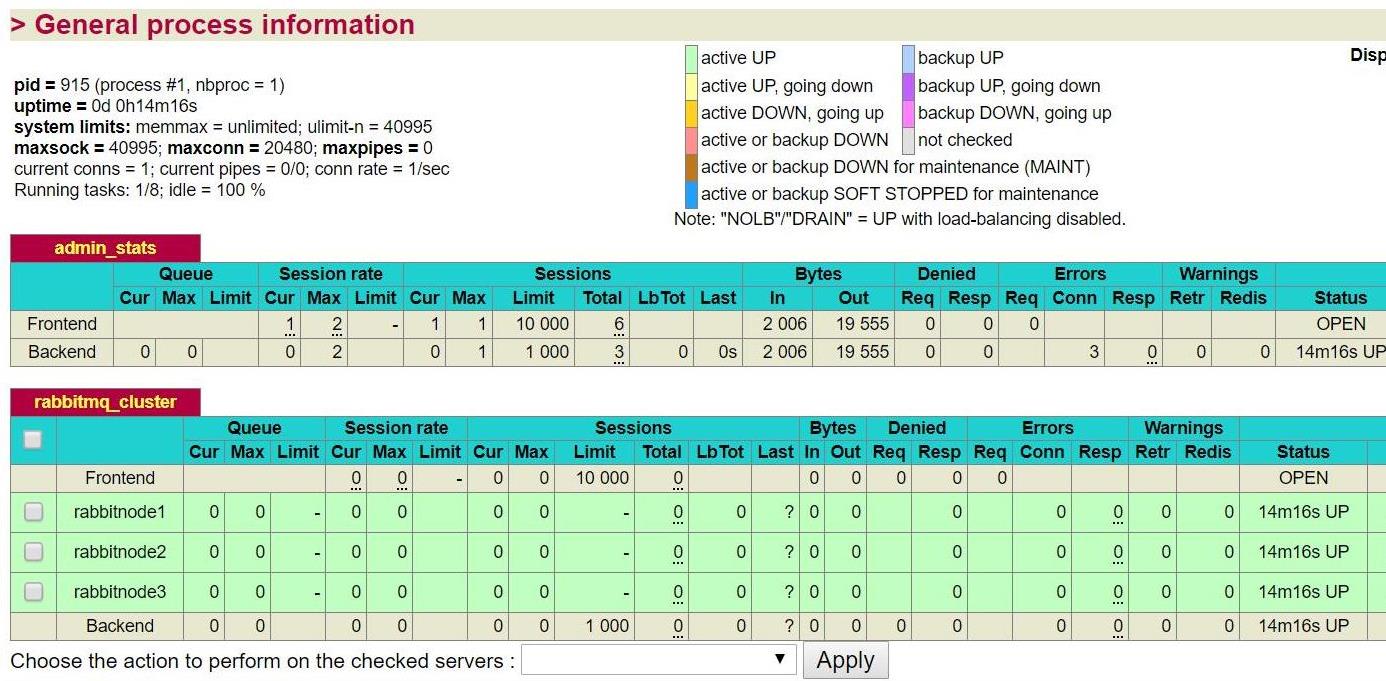
7、haproxy管理页面访问:
http://131.10.11.116:1080/haproxy/stats #访问的时候要注意防火墙,开始防火墙没关闭,访问不到。 后面的/haproxy/stats也是haproxy.cfg里面配置的,可以改
根据/etc/haproxy/haproxy.cfg的配置,页面的用户名和密码是admin /admin
登录进去看到是这样的(测试的haproxy忘了截图,找了个另外环境的haproxy截图):
=======================Haproxy开启日志记录==========================
1、创建日志文件/var/log/haproxy/haproxy.log
    cd /var/log
    sudo mkdir haproxy
    cd haproxy
    sudo touch haproxy.log
    sudo chmod a+w haproxy.log
2、开启rsyslog的haproxy日志记录功能
2.1 编辑/etc/rsyslog.conf文件,将下面两行去掉注释:
    $ModLoad imudp
    $UDPServerRun 514
并且在
    # Save boot messages also to boot.log
    local7.*                                                /var/log/boot.log
这两行后面添加三行新的内容:
    # Save haproxy log
    local3.*                       /var/log/haproxy/haproxy.log
    local0.*                       /var/log/haproxy/haproxy.log
2.2 修改/etc/sysconfig/rsyslog 文件
将SYSLOGD_OPTIONS="" 改成 SYSLOGD_OPTIONS="-r -m 0 -c 2" 3、配置haproxy
修改/etc/haproxy/haproxy.cfg文件,在global区段添加
log 127.0.0.1 local0 info4、重启rsyslog和haproxy服务,haproxy就能记录日志了。
    systemctl restart rsyslog
    service haproxy restart
参考文档:
https://blog.csdn.net/u012758088/article/details/78642063
https://blog.csdn.net/secsky/article/details/60576455
转载于:https://blog.51cto.com/10950710/2136098
智能推荐
RabbitMQ + Haproxy 高可用队列集群
1.RabbitMQ是消息队列中间件是分布式系统中重要的组件,其作用是:系统应用耦合,异步消息,流量削锋等。由erlang开发的AMQP(Advanved Message Queue)的开源实现,官方地址:http://www.rabbitmq.com 2.Haproxy提供高可用性、负载均衡,以及基于TCP和HTTP的应用程序代理。(负载均衡策略有很多:轮询、加权轮询、源地址哈希、最小连接数等等...

Haproxy+Keepalived代理RabbitMq集群
####环境准备: 前面已经部署好了RabbitMq集群,https://www.jianshu.com/p/47391a5805b1 192.168.47.145 ----zabbix 192.168.47.147 ----zabbix1 192.168.47.129 ----zabbix2 测试环境:centos7.6 两台虚拟机,部署软件:Haproxy+Keepalived | 关闭防火墙...
linux Haproxy+rabbitMQ 镜像集群安装
rabbitMQ 安装需要安装erlang,erlang 需要 c++编译处理。因此安装步骤如下: 多说一句,为了以后集群方便知道 rabbitmq在那个主机,建议修改hostname。具体修改方法请参考其他网友解决方案 如:http://blog.csdn.net/yangshangwei/article/details/52878530 我分别给两台服务器修改了hostname, 修改后的ip...
Rabbitmq镜像模式集群+Haproxy+Keepalived
Rabbitmq镜像模式集群+Haproxy+Keepalived 1、部署 RabbitMQ Cluster(HA) 1)、3台centos7操作系统,ip分别为: 10.11.59.113 10.11.59.114 10.11.59.115 域名解析: 确定三台rabbitmq可以ping通 安装依赖的erlang环境(3台) rabbitmq常用命令 启动rabbitmq 账号配置(安装启动...
RabbitMQ集群代理HAProxy的安装
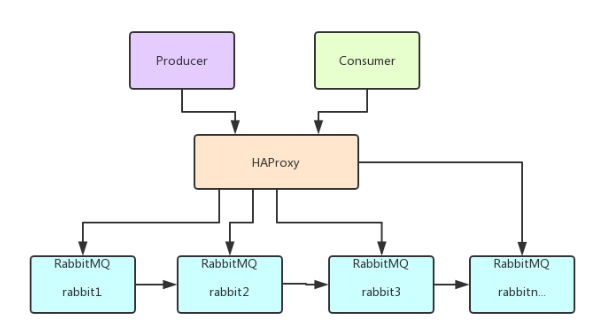
在集群处理中,我们需要一个中间代理进行一个转发。因为程序写好,发布上线后,总不能因为一个节点挂了,然后修改程序的配置指向另一个节点。所以,我们需要一个控制管理对某个集群进行统一管理,而外部只需要对这个控制管理代理进行操作即可。哪怕内部任意一个节点挂了,提供给外部访问的还是控制管理代理。 如图所示: 下载依赖包 yum install gcc vim wget 解压上传haproxy源码包 tar ...
猜你喜欢

Mybatis基础(part 1)
一.mybatis调用SQL语句 1.使用XML配置SQL语句 在SqlMapConfig.xml配置数据源并指定映射配置文件的位置(每个DAO对应的XML文件,该文件映射了DAO的全限定类名) 2.使用注解配置sql语句 在SqlMapConfig.xml配置数据源和class属性(指定被注解的dao全限定类名),在DAO上写注解。 用注解来配置,故此处使用class属性指定被注解...

Docker 容器内运行 Dubbo 服务
原文:http://www.aqcoder.com/post/content?id=41 在使用 Docker 容器内运行 Dubbo 服务的时候一个令人很头痛的问题就是服务地址注册。 Docker 容器内有自己的 IP 段,和宿主主机是隔离的,Dubbo 会使用容器内的 IP 注册到 zookeeper 注册中心上。这样其他的服务是无法访问的。 方式一:–host 一个很直接的方案就...

python基础教程
Python基础教程 一、简介 1.1 python语言介绍 python的创始人:Guido Van Rossum Python下载地址:https://www.python.org/ Python文档下载地址:https://www.python.org/doc/ Pycharm下载地址:https://www.runoob.com/w3cnote/pycharm-windows-instal...
1、Git安装与配置
1、Git安装与配置 一:版本控制 定义:版本控制是一种记录一个或若干文件内容变化,以便将来查阅特定版本修订情况的系统。 为什么要用版本控制:在起初的项目开发中,我们会不断的编写代码,但是,害怕有一天系统突然挂掉了,完蛋,辛苦写的代码就这么没了,所有为了防止这一点,都会开发一点就以目录拷贝的形式保存下来,自己这么1.0、2.0、3.0…的这么去标记,开始的还好,后面的话你压根就不知道...

Golang net/rpc 包的深度解读和学习
Golang 提供了一个开箱即用的RPC服务,实现方式简约而不简单。本文对net/rpc 包做深度解读和学习实战。 RPC 简单介绍 远程过程调用 (Remote Procedure Call,RPC) 是一种计算机通信协议。允许运行在一台计算机的程序调用另一个地址空间的子程序(一般是开放网络中的一台计算机),而程序员就像调用调用本地程序一样,无需额外做交互编程。RPC 是一种 CS (Clien...
