学好英语网网页
标签: javascript css html



<!DOCTYPE html PUBLIC"-//W3C//DTD XHTML 1.0 Transitional//EN"
"http://www.w3.org/TR/xhtml11/DTD/xhtnl-transitional.dtd">
<html xmlns="http://www.w3.org/1999/xhtml">
<head>
<meta http-equiv="Content-Type" content="text/html;charset = utf-8"/>
<title>学好英语网</title>
<link rel="stylesheet" href="css/style08.css" type="text/css"/>
<script type="text/javascript" src="js/js08.js"></script>
</head>
<body>
<div class="head">
<div class="left"><img src="images/logo.jpg"/></div>
<div class="right"><img src="images/phone.jpg"/></div>
</div>
<div id="nav">
<ul class="nav">
<li><a href="#" class="color_in">首页</a></li>
<li><a href="#" >机构</a></li>
<li><a href="#" >少儿英语</a></li>
<li><a href="#" >成人英语</a></li>
<li><a href="#" >托福雅思</a></li>
<li><a href="#" >英语四级</a></li>
<li><a href="#" >英语六级</a></li>
</ul>
</div>
<div class="banner">
<ul class="banner_pic" id="banner_pic">
<li class="current"><img class="one" src="images/01.jpg"/></li>
<li class="pic"><img class="one" src="images/02.jpg"/></li>
<li class="pic"><img class="one" src="images/03.jpg"/></li>
</ul>
<ol id="button">
<li class="current"></li>
<li class="but"></li>
<li class="but"></li>
</ol>
</div>
<div id="learn">
<h2>学好英语网简介</h2>
<dl>
<dt></dt>
<dd class="txt1">你知道学好英语网的好处吗?</dd>
<dd class="txt2">不论你学习英语是为了满足日常沟通的需要,还是为了工作和职业的发展,不论你现在的英语水平处在哪个阶段,
想要往哪个阶段,我们的英语都能够帮你达成目标。来自于美国硅谷“DynEd International”历经16年在全球80多个国家的成功实践,
听说读写全面覆盖的教学内容,使用而有趣的教材设计针对不同阶段的学员水平,从入门到精通的9个级别的英语晋升阶梯,让你的
学习成为轻松,快乐的旅程!高雅,舒适的教学环境,为您提供一个高端人士社交的平台,专业的个人课程顾问和双语指导老师将
对您的学习效果提供保障。学好英语网已成为中国英语教育史上新的里程碑!</dd>
</dl>
<div class="imgbox" id="imgbox">
<span>
<a href="#"><img src="images/1.jpg"/></a>
<a href="#"><img src="images/2.jpg"/></a>
<a href="#"><img src="images/3.jpg"/></a>
<a href="#"><img src="images/4.jpg"/></a>
</span>
</div>
</div>
<div id="features">
<h2>英语课程特色</h2>
<div class="list0">
<div id="SwitchBigPic">
<span class="sp"><a href="#"><img src="images/111.jpg"/></a></span>
<span ><a href="#"><img src="images/222.jpg"/></a></span>
<span ><a href="#"><img src="images/333.jpg"/></a></span>
</div>
<ul id="SwitchNav">
<li><a class="txt_img1" href="#" ></a></li>
<li><a class="txt_img2" href="#" ></a></li>
<li><a class="txt_img3" href="#" ></a></li>
</ul>
</div>
<div class="list1">
<h3></h3>
<form action="#" method="post" class="biaodan">
<table class="content">
<tr>
<td class="left">姓名:</td>
<td ><input type="text" class="txt01"/></td>
</tr>
<tr>
<td class="left">手机:</td>
<td ><input type="text" class="txt01"/></td>
</tr>
<tr>
<td class="left">邮箱:</td>
<td ><input type="text" class="txt01"/></td>
</tr>
<tr>
<td class="left">中心:</td>
<td >
<select class="course">
<option>请选择学习中心</option>
<option>北京学习中心</option>
<option>上海学习中心</option>
<option>广州学习中心</option>
<option>深圳学习中心</option>
</select>
</td>
</tr>
<tr>
<td colspan="2"><input class="no-border" type="button"/></td>
</tr>
</table>
</form>
</form>
</div>
</div>
<div class="footer">
学好英语网版权所有2000-2016京ICP备08001421号 京公网安备110108007701
</div>
</body>
</html>
*{margin:0;padding:0;list-style:none;outline:none;border:0;background:none;}
body{font-family:"微软雅黑";font-size:14px;}
a:link,a:visited{text-decoration:none;color:#fff;}
a:hover{text-decoration:none;}

.head{width:980px;margin:0 auto;height:50px;padding-top:30px;}
.head .left{float:left;}
.head .right{float:right;}

#nav{width:100%;background:#0373b9;}
.nav{width:980px;height:35px;line-height:35px;margin:0 auto;text-align:center;font-size:14px;}
.nav li{float:left;}
.nav a{display:inline-block;padding:0 40px;}
.nav a:hover{background:#25abff;}
.nav .color_in{background:#25abff;}

.banner{width:100%;height:580px;position:relative;overflow:hidden;}
.one{position:absolute;left:50%;top:0;margin-left:-960px;}
.banner .banner_pic .pic{display:none;}
.banner .banner_pic .current{display:block;}
.banner ol{position:absolute;left:50%;top:90%;margin-left:-62px;}
.banner ol .but{float:left;width:28px;height:1px;border:1px solid #d6d6d6;margin-right:20px;}
.banner ol li{cursor:pointer;}
.banner ol .current{background:#90d1d5;float:left;width:28px;height:1px;border:1px solid #90d1d5;margin-right:20px;}

#learn{width:980px;margin:0 auto;}
h2{font-weight:100;font-size:24px;color:#585858;padding:40px 0;border-bottom:7px solid #ececec;}
#learn dl{width:980px;height:220px;}
#learn dt{width:145px;height:220px;background:url(../images/learn.jpg) center center no-repeat;float:left;}
#learn dd{width:780px;padding:20px 0 0 30px;float:left;}
#learn .txt1{font-size:24px;color:#ffa800;}
#learn .txt2{color:#6b6862;line-height:24px;}
.imgbox{width:940px;padding:0 20px;white-space:nowrap;overflow:hidden;}
.imgbox img{width:226px;height:129px;padding:2px;}
.imgbox a{margin-right:20px;}

#features{width:980px;height:565px;margin:0 auto;}
.list0{width:639px;margin-top:25px;float:left;position:relative;}
#SwitchBigPic{border:1px solid #ddd;}
#SwitchBigPic span{display:none;}
#SwitchBigPic img{width:448px;height:375px;}
#SwitchBigPic .sp{display:block;}
#SwitchNav{width:190px;position:absolute;top:0px;left:447px;}
#SwitchNav li{width:190px;height:125px;margin-bottom:1px;}
#SwitchNav a{display:block;width:190px;height:125px;background:url(../images/txt_111_1.jpg) no-repeat;}
#SwitchNav .txt_img2{background:url(../images/txt_222_2.jpg)no-repeat;}
#SwitchNav .txt_img3{background:url(../images/txt_333_3.jpg)no-repeat;}
#SwitchNav .txt_img1:hover{background:url(../images/txt_111.jpg)no-repeat;}
#SwitchNav .txt_img2:hover{background:url(../images/txt_222.jpg)no-repeat;}
#SwitchNav .txt_img3:hover{background:url(../images/txt_333.jpg)no-repeat;}
.list1{width:326px;height:375px;margin-top:25px;float:right;}
.list1 h3{width:326px;height:74px;background:url(../images/zhuce.jpg)no-repeat;}
.list .biaodan{width:326px;height:200px;}
.left{width:80px;text-align:right;font-size:18px;}
tr{height:50px;}
td{text-align:center;}
input{width:204px;height:28px;border:1px solid #d2d2d2;}
.course{width:204px;height:28px;border:1px solid #d2d2d2;padding:3px 0;}
.no-border{border:none;width:222px;height:53px;background:url(../images/btn.jpg)right top no-repeat;margin-top:30px;cursor:pointer;}


.footer{width:100%;height:60px;line-height:60px;text-align:center;background:#0373b9;color:#FFF;}
window.onload=function(){
	//顶部的焦点图切换
	function hotChange()
	{
		var current_index=0;
		var timer=window.setInterval(autoChange,3000);
		var button_li=document.getElementById("button").getElementsByTagName("li");
		var pic_li=document.getElementById("banner_pic").getElementsByTagName("li");
		for(var i=0;i<button_li.length;i++)
		{
			//鼠标移动到按钮上
			button_li[i].onmouseover=function()
			{
				if(timer){clearInterval(timer);}//停止自动切换
				for(var j=0;j<pic_li.length;j++)
				{
					if(button_li[j]==this)//如果鼠标移动到j按钮上,更改样式
					{
						current_index=j;
						button_li[j].className="current";
						pic_li[j].className="current";
					}
					else
					{
						button_li[j].className="but";
						pic_li[j].className="pic";
					}
				}
			}
			//鼠标离开按钮
			button_li[i].onmouseout=function()
			{
				timer=setInterval(autoChange,3000);//继续自动切换
			}
		}
	function autoChange()
	{
		++current_index;
		if(current_index==button_li.length){current_index=0;}
		for(var i=0;i<button_li.length;i++)
		{
			if(i==current_index)
			{
				button_li[i].className="current";
				pic_li[i].className="current";
			}
			else
			{
				button_li[i].className="but";
				pic_li[i].className="pic";
			}
		}
		}
	}
	hotChange();


function school()
{
	var speed=50;
	var imgbox=document.getElementById("imgbox");
	imgbox.innerHTML+=imgbox.innerHTML;
	var span=imgbox.getElementsByTagName("span");
	var timer1=window.setInterval(marquee,speed);
	imgbox.onmouseover=function(){clearInterval(timer1);}
	imgbox.onmouseout=function(){timer1=setInterval(marquee,speed);};
	function marquee()
	{
		if(imgbox.scrollLeft>span[0].offsetWidth)
		{
			imgbox.scrollLeft=0;
		}
		else
		{
			++imgbox.scrollLeft;
		}
	}
}
school();

function tableChange()
{
	var lis=document.getElementById("SwitchNav").getElementsByTagName("li");
	var spans=document.getElementById("SwitchBigPic").getElementsByTagName("span");
	var current_index=0;
	var timer=setInterval(autoChange,3000);
	for(var i=0;i<lis.length;i++)
	{
		lis[i].onmouseover=function()
		{
			if(timer){clearInterval(timer);}
			for(var i=0;i<lis.length;i++)
			{
				if(lis[i]==this)
				{
					spans[i].className="sp";
					current_index=i;
				}
				else
				{
					spans[i].className="";
				}
			}
		}
		lis[i].onmouseout=function()
		{timer=setInterval(autoChange,3000);}
	}
	function autoChange()
	{
		++current_index;
		if(current_index==lis.length){current_index=0;}
		for(var i=0;i<lis.length;i++)
		{spans[i].className="";}
	    spans[current_index].className="sp";
	}
}
tableChange();
}
智能推荐
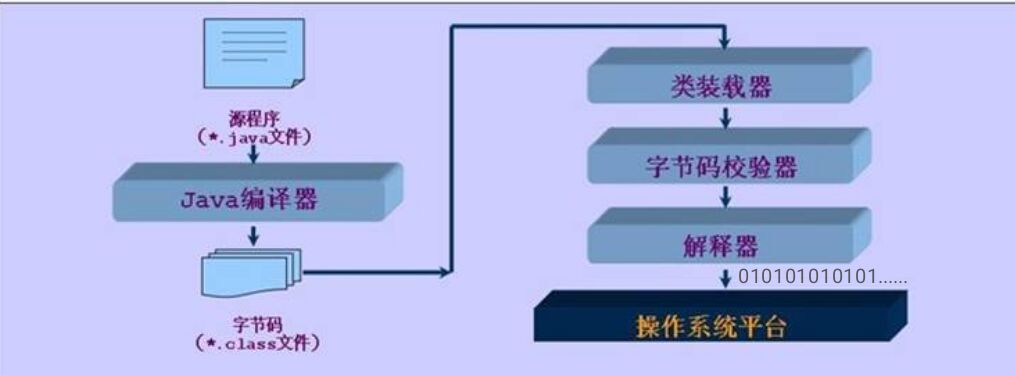
Java运行原理
1.Java运行原理 我们可通过文本编辑板生成Java源代码(.java)经过dos窗口由Java编译器(javac.exe)生成字节码文件(.class),字节码可由Java虚拟机转化为机器码供计算机读取处理。由于Java可以生成字节码可供虚拟机转译所以可跨平台运行。运行过程如下: 所以相对于C语言还需要转化为exe文件才能运行的权限,Java具有跨平台...
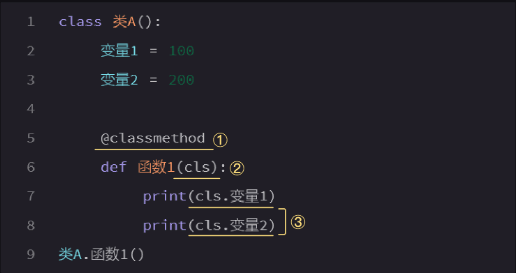
Python由放弃到入门,基础篇七(类)下
类的实例化 有感于现在python教程多如牛毛,且大多高不可攀,多次拜读而不得其门道,遂由入门到放弃。偶有机缘,得一不错教程,得以入门,现博客分享,想要获取完整教程,ff17328081445。 通过对比可以看到,实例化后再使用的格式,①是空着的,意思是这里不再需要@classmethod的声明,并且在第②处,把cls替换成了self。同时,实例化后再使用的格式,需要先赋值然后再调用(第③处): ...
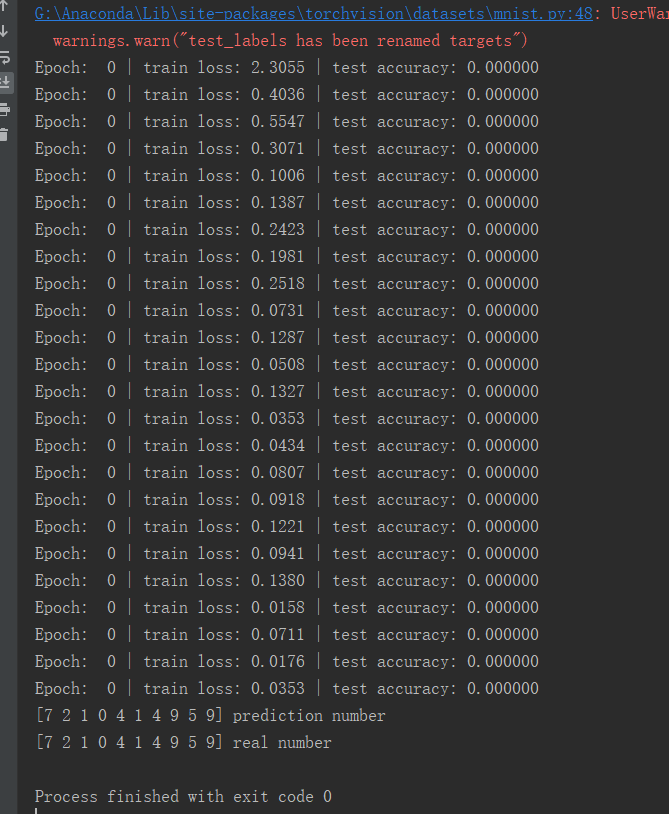
pytorch CNN手写字体识别
数据整体训练一次,对于accuracy都是0的问题,由于刚开始学,有些代码的细节我也没看懂,不过整体结果是对的,可能是由于pytorch版本的更新,导致accuracy的计算方式有所改变 内容转载自:https://www.bilibili.com/video/av15997678/?p=19...
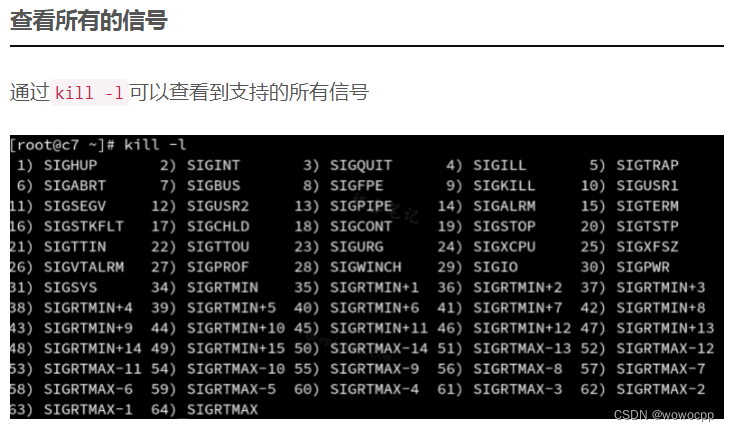
linux后台运行命令总结
linux后台运行命令总结 问题: 我们有时候需要登录远程服务器跑运行时间非常长的脚本,这个时候你要让脚本后台运行,不然占着终端窗口看着不舒服。但万一网络不好,(比如我这儿的破校园网,高峰时几秒钟断一次),终端突然和服务器之间的连接断了,那脚本就会自动停了(因为运行test.sh进程的父进程就是当前的shell终端进程,关闭当前shell终端时,父进程退出,会发送hangup信号给所有子进程,子进...
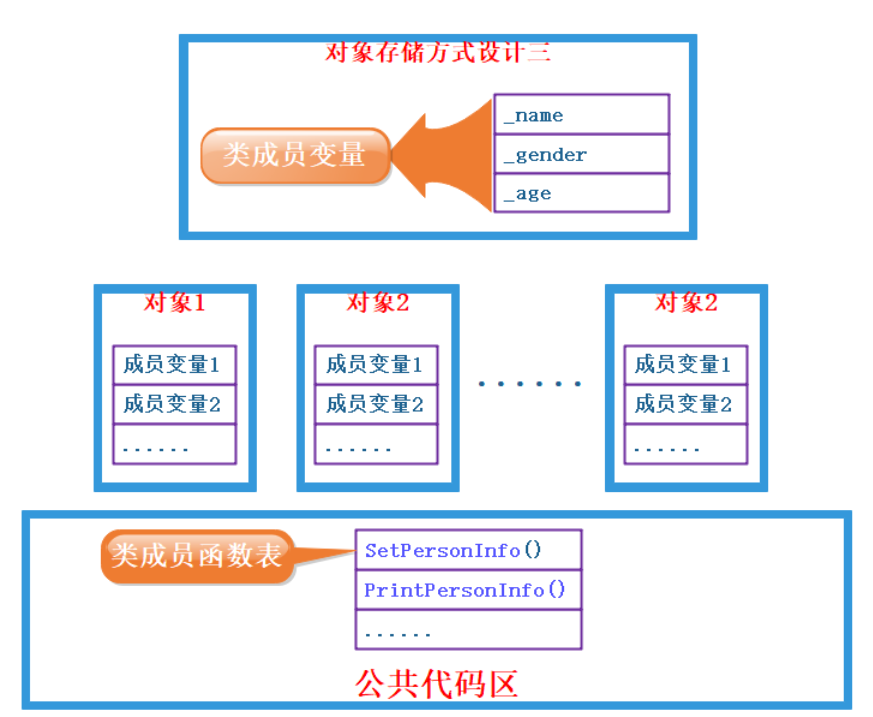
类对象模型和this指针
关于类/对象大小的计算 类只是一种类型定义,它本身是没有大小可言的。 我们这里指的类的大小,其实指的是类的对象所占的大小。因此,如果用sizeof运算符对一个类型名操作,得到的是具有该类型实体的大小。 首先,类大小的计算遵循结构体的对齐原则 类的大小与普通数据成员有关,与成员函数和静态成员无关。即普通成员函数,静态成员函数,静态数据成员,静态常量数据成员均对类的大小无影响 虚函数对类的大小有影响,...
猜你喜欢
3D人脸重建——PRNet网络输出的理解
前言 之前有款换脸软件不是叫ZAO么,分析了一下,它的实现原理绝对是3D人脸重建,而非deepfake方法,找了一篇3D重建的论文和源码看看。这里对源码中的部分函数做了自己的理解和改写。 国际惯例,参考博客: 什么是uv贴图? PRNet论文 PRNet代码 本博客主要是对PRNet的输出进行理解。 理论简介 这篇博客比较系统的介绍了3D人脸重建的方法,就我个人浅显的理解,分为两个流派:1.通过算...
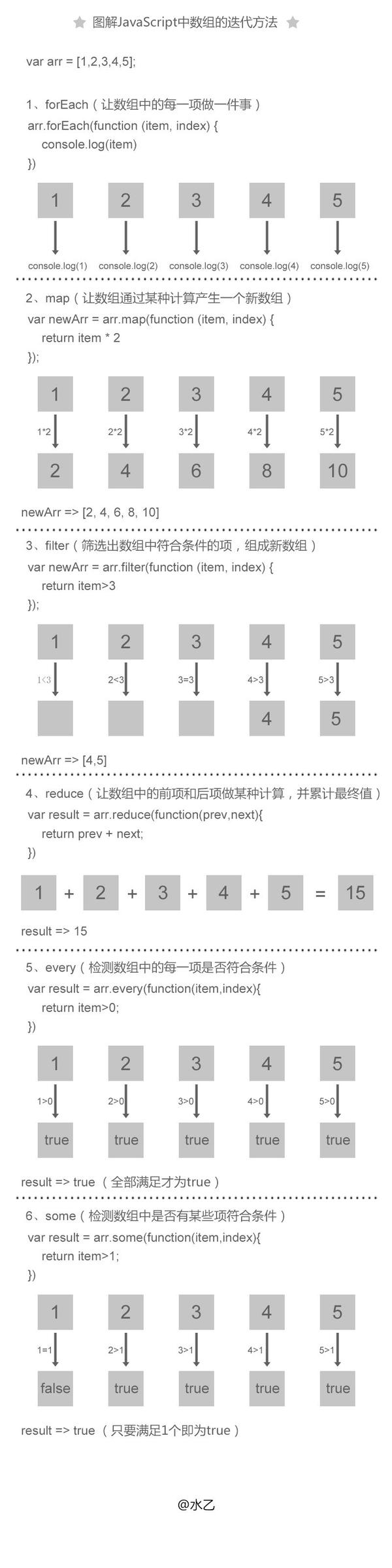
javascript简单的正则表达式入门
内容来自百度前端学院javascript入门课程 基本的HTML: 样式: javascript: document.write和innerHTML有什么区别 前者是直接将内容写入文档流,如果写入之前没有调用document.open,那么回自动调用document.open(每打开一次文档流都会清除之前的所有内容包括变量)。每次写完关闭后重新调用该函数的话,会导致页面重写。 innerHTML是...
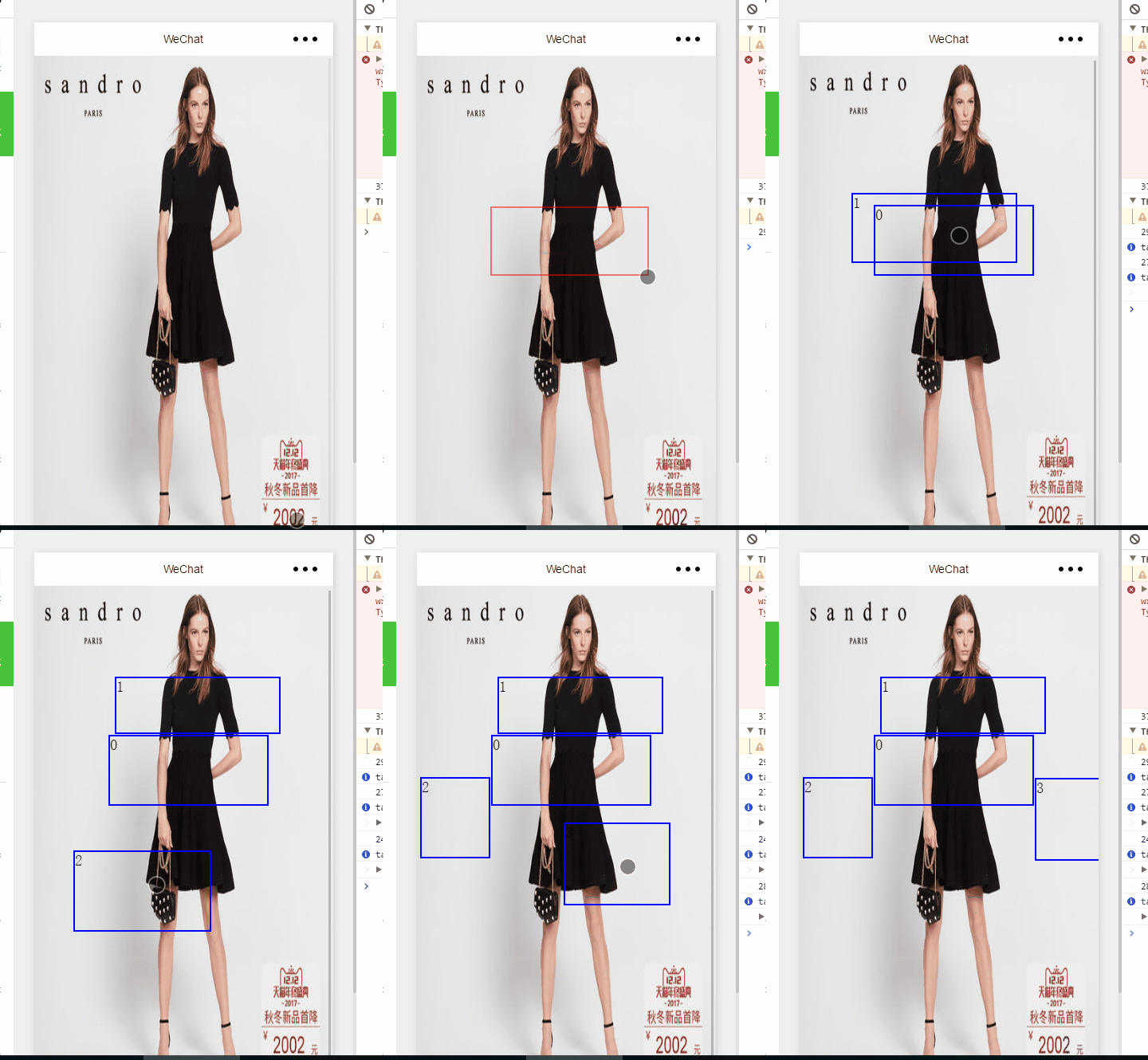
微信小程序一个你可能需要的功能
根据工作需要。需要做一个图片选中部分区域的效果。百度了很久,都没有见有。于是就自己写了个,需要的可以借鉴下,还有很多需要改善的地方 现在先看看效果 效果图 那这个有什么用呢。。需求是选中图片的某个区域然后给它添加注释。还可以有其他用处。那这个是怎么做到的呢 。。首先我说下基本的思路 ——-> 图片作为一个背景。然后上面是一层canvas 以及最上面生成的view 因为...
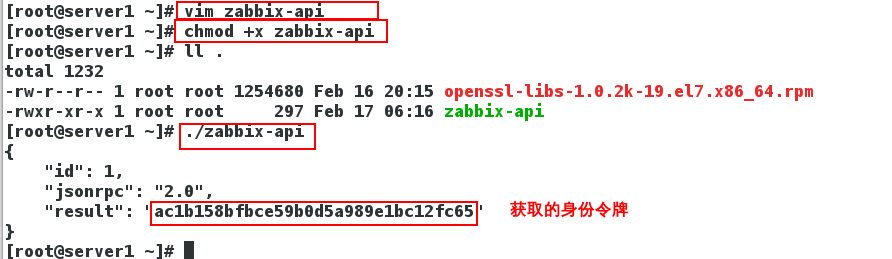
Linux Zabbix分布式监控 通过API接口远程 管理Zabbix所监控主机
一、API 1、什么是API API(Application Programming Interface,应用程序编程接口)是一些预先定义的函数,目的是提供应用程序与开发人员基于某软件或硬件得以访问一组例程的能力,而又无需访问源码,或理解内部工作机制的细节。 Zabbix API允许你以编程方式检索和修改Zabbix的配置,并提供对历史数据的访问。 它广泛用于: 创建新的应用程序以使用Zabbix...
