kafka管理offset方式之使用外部存储保存offset
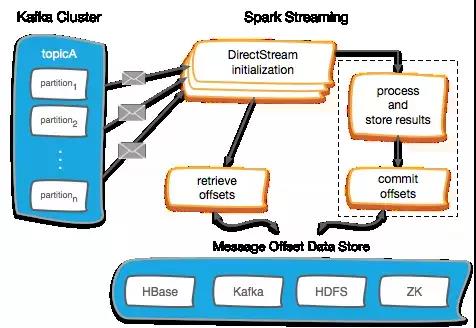
1、Kafka Offset 管理–Checkpoint
- 启用Spark Streaming的checkpoint是存储偏移量最简单的方法。
- 流式checkpoint专门用于保存应用程序的状态, 比如保存在HDFS上,
在故障时能恢复。 - Spark Streaming的checkpoint无法跨越应用程序进行恢复。
- Spark 升级也将导致无法恢复。
- 在关键生产应用, 不建议使用spark检查点的管理offset方式。
代码如下:
/**
  * 用checkpoint记录offset
  * 优点:实现过程简单
  * 缺点:如果streaming的业务更改,或别的作业也需要获取该offset,是获取不到的
  */
import kafka.serializer.StringDecoder
import org.apache.spark.SparkConf
import org.apache.spark.streaming.kafka.KafkaUtils
import org.apache.spark.streaming.{Duration, Seconds, StreamingContext}

object StreamingWithCheckpoint {
  def main(args: Array[String]) {
    //val Array(brokers, topics) = args
    val processingInterval = 2
    val brokers = "node01:9092,node02:9092,node03:9092"
    val topics = "mytest1"
    // Create context with 2 second batch interval
    val sparkConf = new SparkConf().setAppName("ConsumerWithCheckPoint").setMaster("local[2]")
    // Create direct kafka stream with brokers and topics
    val topicsSet = topics.split(",").toSet
    val kafkaParams = Map[String, String]("metadata.broker.list" -> brokers, "auto.offset.reset" -> "smallest")
    val checkpointPath = "hdfs://node01:9000/spark_checkpoint1"

    def functionToCreateContext(): StreamingContext = {
      val ssc = new StreamingContext(sparkConf, Seconds(processingInterval))
      val messages = KafkaUtils.createDirectStream[String, String, StringDecoder, StringDecoder](ssc, kafkaParams, topicsSet)

      ssc.checkpoint(checkpointPath)
      messages.checkpoint(Duration(8 * processingInterval.toInt * 1000))
      messages.foreachRDD(rdd => {
        if (!rdd.isEmpty()) {
          println("################################" + rdd.count())
        }

      })
      ssc
    }

    // 如果没有checkpoint信息,则新建一个StreamingContext
    // 如果有checkpoint信息,则从checkpoint中记录的信息恢复StreamingContext
    // createOnError参数:如果在读取检查点数据时出错,是否创建新的流上下文。
    // 默认情况下,将在错误上引发异常。
    val context = StreamingContext.getOrCreate(checkpointPath, functionToCreateContext _)
    context.start()
    context.awaitTermination()
  }
}
// 以上案例测试过程:
// 模拟消费者向mytest1插入10条数据,
// 强制停止streaming,
// 再插入20条数据并启动streaming查看读取的条数为20条
2、Kafka Offset 管理–Zookeeper
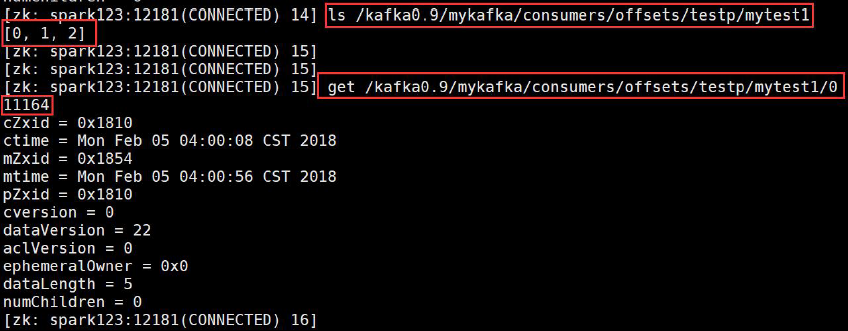
- 路径:
val zkPath = s"{kakfaOffsetRootPath}/{groupName}/{o.topic}/{o.partition}" - 如果Zookeeper中未保存offset,根据kafkaParam的配置使用最新或者最旧的offset
- 如果 zookeeper中有保存offset,我们会利用这个offset作为kafkaStream的起始位置
代码如下:
import kafka.common.TopicAndPartition
import kafka.message.MessageAndMetadata
import kafka.serializer.StringDecoder
import org.apache.curator.framework.CuratorFrameworkFactory
import org.apache.curator.retry.ExponentialBackoffRetry
import org.apache.spark.SparkConf
import org.apache.spark.streaming.dstream.InputDStream
import org.apache.spark.streaming.kafka.{HasOffsetRanges, KafkaUtils, OffsetRange}
import org.apache.spark.streaming.{Seconds, StreamingContext}

import scala.collection.JavaConversions._

object KafkaZKManager  extends Serializable{
  /**
    * 创建zookeeper客户端
    */
  val client = {
    val client = CuratorFrameworkFactory
      .builder
      .connectString("node01:2181/kafka0.9") // zk中kafka的路径
      .retryPolicy(new ExponentialBackoffRetry(1000, 3)) // 重试指定的次数, 且每一次重试之间停顿的时间逐渐增加
      .namespace("mykafka") // 命名空间:mykafka
      .build()
    client.start()
    client
  }

  val kafkaOffsetRootPath = "/consumers/offsets"

  /**
    * 确保zookeeper中的路径是存在的
    * @param path
    */
  def ensureZKPathExists(path: String): Unit = {
    if (client.checkExists().forPath(path) == null) {
      client.create().creatingParentsIfNeeded().forPath(path)
    }
  }

  def storeOffsets(offsetsRanges:Array[OffsetRange], groupName:String) = {
    for (o <- offsetsRanges) {
      val zkPath = s"${kafkaOffsetRootPath}/${groupName}/${o.topic}/${o.partition}"
      ensureZKPathExists(zkPath)
      // 保存offset到zk
      client.setData().forPath(zkPath, o.untilOffset.toString.getBytes())
    }
  }

  /**
    * 用于获取offset
    * @param topic
    * @param groupName
    * @return
    */
  def getFromOffsets(topic : String,groupName : String): (Map[TopicAndPartition, Long], Int) = {
    // 如果 zookeeper中有保存offset,我们会利用这个offset作为kafkaStream 的起始位置
    var fromOffsets: Map[TopicAndPartition, Long] = Map()
    val zkTopicPath = s"${kafkaOffsetRootPath}/${groupName}/${topic}"
    // 确保zookeeper中的路径是否存在
    ensureZKPathExists(zkTopicPath)
 	// 获取topic中,各分区对应的offset
    val offsets: mutable.Buffer[(TopicAndPartition, Long)] = for {
      // 获取分区
      p <- client.getChildren.forPath(zkTopicPath)
    } yield {
      //遍历路径下面的partition中的offset
      val data = client.getData.forPath(s"$zkTopicPath/$p")
      //将data变成Long类型
      val offset = java.lang.Long.valueOf(new String(data)).toLong
      println("offset:" + offset)
      (TopicAndPartition(topic, Integer.parseInt(p)), offset)
    }

    if(offsets.isEmpty) {
      (offsets.toMap,0)
    }else{
      (offsets.toMap,1)
    }
  }

  def main(args: Array[String]): Unit = {
    val processingInterval = 2
    val brokers = "node01:9092,node02:9092,node03:9092"
    val topic = "mytest1"
    val sparkConf = new SparkConf().setAppName("KafkaZKManager").setMaster("local[2]")
    // Create direct kafka stream with brokers and topics
    val topicsSet = topic.split(",").toSet
    val kafkaParams = Map[String, String]("metadata.broker.list" -> brokers,
      "auto.offset.reset" -> "smallest")

    val ssc = new StreamingContext(sparkConf, Seconds(processingInterval))

    // 读取kafka数据
    val messages = createMyDirectKafkaStream(ssc, kafkaParams, topic, "group01")

    messages.foreachRDD((rdd,btime) => {
      if(!rdd.isEmpty()){
        println("==========================:" + rdd.count() )
        println("==========================btime:" + btime )
      }
      // 消费到数据后,将offset保存到zk
      storeOffsets(rdd.asInstanceOf[HasOffsetRanges].offsetRanges, "group01")
    })

    ssc.start()
    ssc.awaitTermination()
   }

  def createMyDirectKafkaStream(ssc: StreamingContext, kafkaParams: Map[String, String], topic: String, groupName: String): InputDStream[(String, String)] = {
    // 获取offset
    val (fromOffsets, flag) = getFromOffsets( topic, groupName)
    var kafkaStream : InputDStream[(String, String)] = null
    if (flag == 1) {
      // 这个会将kafka的消息进行transform,最终kafak的数据都会变成(topic_name, message)这样的tuple
      val messageHandler = (mmd : MessageAndMetadata[String, String]) => (mmd.topic, mmd.message())
      println("fromOffsets:" + fromOffsets)
      kafkaStream = KafkaUtils.createDirectStream[String, String, StringDecoder, StringDecoder, (String, String)](ssc, kafkaParams, fromOffsets, messageHandler)
    } else {
      // 如果未保存,根据kafkaParam的配置使用最新或者最旧的offset
      kafkaStream = KafkaUtils.createDirectStream[String, String, StringDecoder, StringDecoder](ssc, kafkaParams, topic.split(",").toSet)
    }
    kafkaStream
  }

}
启动zk命令:node1为master节点
zkCli.sh -timeout 5000 -r -server node1:2181
3、Kafka Offset 管理–Hbase
-
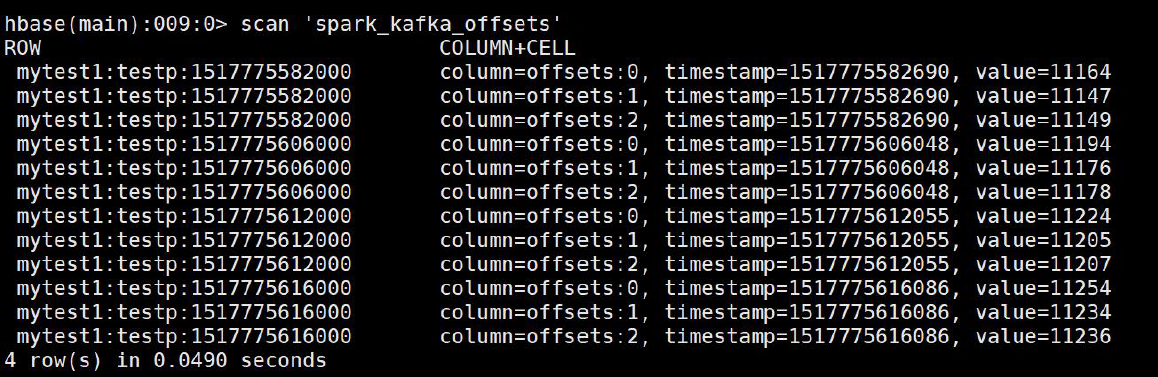
基于Hbase的通用设计, 使用同一张表保存可以跨越多个spark streaming程序的topic的offset
-
rowkey = topic名称 + groupid + streaming的batchtime.milliSeconds . 尽管
batchtime.milliSeconds不是必须的, 但是它可以看到历史的批处理任务对offset的管理情况。 -
kafka的offset保存在下面的表中,列簇为offsets, 30天后自动过期
Hbase表结构:后面的时间为秒级
create ‘spark_kafka_offsets’, {NAME=>‘offsets’, TTL=>2592000} -
offset的获取场景
场景1:Streaming作业首次启动。 通过zookeeper来查找给定topic中分区的数量,然后返回“0”
作为所有topic分区的offset。
场景2:长时间运行的Streaming作业已经停止,新的分区被添加到kafka的topic中。 通过
zookeeper来查找给定topic中分区的数量, 对于所有旧的topic分区,将offset设置为HBase中的最新偏移量。 对于所有新的topic分区,它将返回“0”作为offset。
场景3:长时间运行的Streaming作业已停止,topic分区没有任何更改。 在这种情况下,HBase
中发现的最新偏移量作为每个topic分区的offset返回。代码如下
import kafka.common.TopicAndPartition
import kafka.message.MessageAndMetadata
import kafka.serializer.StringDecoder
import kafka.utils.ZkUtils
import org.apache.hadoop.hbase.client.{ConnectionFactory, Put, Scan}
import org.apache.hadoop.hbase.util.Bytes
import org.apache.hadoop.hbase.{HBaseConfiguration, TableName}
import org.apache.spark.SparkConf
import org.apache.spark.streaming.dstream.InputDStream
import org.apache.spark.streaming.kafka.{HasOffsetRanges, KafkaUtils, OffsetRange}
import org.apache.spark.streaming.{Seconds, StreamingContext}

object KafkaHbaseManager {
  // 保存offset到hbase
  def saveOffsets(TOPIC_NAME: String, GROUP_ID: String, offsetRanges: Array[OffsetRange],
                  hbaseTableName: String, batchTime: org.apache.spark.streaming.Time) = {
    val hbaseConf = HBaseConfiguration.create()
    val conn = ConnectionFactory.createConnection(hbaseConf)
    val table = conn.getTable(TableName.valueOf(hbaseTableName))
    val rowKey = TOPIC_NAME + ":" + GROUP_ID + ":" + String.valueOf(batchTime.milliseconds)
    val put = new Put(rowKey.getBytes())
    for (offset <- offsetRanges) {
      put.addColumn(Bytes.toBytes("offsets"), Bytes.toBytes(offset.partition.toString),
        Bytes.toBytes(offset.untilOffset.toString))
    }
    table.put(put)
    conn.close()
  }

  // 从zookeeper中获取topic的分区数
  def getNumberOfPartitionsForTopicFromZK(TOPIC_NAME: String, GROUP_ID: String,
                                          zkQuorum: String, zkRootDir: String, sessTimeout: Int, connTimeOut: Int): Int = {
    val zkUrl = zkQuorum + "/" + zkRootDir
    val zkClientAndConn = ZkUtils.createZkClientAndConnection(zkUrl, sessTimeout, connTimeOut)
    val zkUtils = new ZkUtils(zkClientAndConn._1, zkClientAndConn._2, false)
    // 获取分区数量
    val zkPartitions = zkUtils.getPartitionsForTopics(Seq(TOPIC_NAME)).get(TOPIC_NAME).toList.head.size
    println(zkPartitions)
    zkClientAndConn._1.close()
    zkClientAndConn._2.close()
    zkPartitions
  }

  // 获取hbase的offset
  def getLastestOffsets(TOPIC_NAME: String, GROUP_ID: String, hTableName: String,
                        zkQuorum: String, zkRootDir: String, sessTimeout: Int, connTimeOut: Int): Map[TopicAndPartition, Long] = {

    // 连接zk获取topic的partition数量
    val zKNumberOfPartitions = getNumberOfPartitionsForTopicFromZK(TOPIC_NAME, GROUP_ID, zkQuorum, zkRootDir, sessTimeout, connTimeOut)

    val hbaseConf = HBaseConfiguration.create()

    // 获取hbase中最后提交的offset
    val conn = ConnectionFactory.createConnection(hbaseConf)
    val table = conn.getTable(TableName.valueOf(hTableName))
    val startRow = TOPIC_NAME + ":" + GROUP_ID + ":" + String.valueOf(System.currentTimeMillis())
    val stopRow = TOPIC_NAME + ":" + GROUP_ID + ":" + 0
    val scan = new Scan()
    val scanner = table.getScanner(scan.setStartRow(startRow.getBytes).setStopRow(stopRow.getBytes).setReversed(true))
    val result = scanner.next()

    var hbaseNumberOfPartitions = 0 // 在hbase中获取的分区数量
    if (result != null) {
      // 将分区数量设置为hbase表的列数量
      hbaseNumberOfPartitions = result.listCells().size()
    }

    val fromOffsets = collection.mutable.Map[TopicAndPartition, Long]()
    if (hbaseNumberOfPartitions == 0) { // 如果没有保存过offset
      // 初始化kafka为开始
      for (partition <- 0 until zKNumberOfPartitions) {
        fromOffsets += ((TopicAndPartition(TOPIC_NAME, partition), 0))
      }

    } else if (zKNumberOfPartitions > hbaseNumberOfPartitions) { // 如果zk的partition数量大于hbase的partition数量,说明topic增加了分区,就需要对分区做单独处理
      // 处理新增加的分区添加到kafka的topic
      for (partition <- 0 until zKNumberOfPartitions) {
        val fromOffset = Bytes.toString(result.getValue(Bytes.toBytes("offsets"),
          Bytes.toBytes(partition.toString)))
        fromOffsets += ((TopicAndPartition(TOPIC_NAME, partition), fromOffset.toLong))
      }
      // 对新增加的分区将它的offset值设为0
      for (partition <- hbaseNumberOfPartitions until zKNumberOfPartitions) {
        fromOffsets += ((TopicAndPartition(TOPIC_NAME, partition), 0))
      }
    } else { // 如果既没有新增加的分区,也不是第一次运行
      // 获取上次运行的offset
      for (partition <- 0 until hbaseNumberOfPartitions) {
        val fromOffset = Bytes.toString(result.getValue(Bytes.toBytes("offsets"),
          Bytes.toBytes(partition.toString)))
        fromOffsets += ((TopicAndPartition(TOPIC_NAME, partition), fromOffset.toLong))
      }
    }

    scanner.close()
    conn.close()
    fromOffsets.toMap
  }

  def main(args: Array[String]): Unit = {
    val processingInterval = 2
    val brokers = "node01:9092,node02:9092,node03:9092"
    val topics = "mytest1"
    // Create context with 2 second batch interval
    val sparkConf = new SparkConf().setAppName("kafkahbase").setMaster("local[2]")
    // Create direct kafka stream with brokers and topics
    val topicsSet = topics.split(",").toSet
    val kafkaParams = Map[String, String]("metadata.broker.list" -> brokers,
      "auto.offset.reset" -> "smallest")

    val ssc = new StreamingContext(sparkConf, Seconds(processingInterval))
    val groupId = "testp"
    val hbaseTableName = "spark_kafka_offsets"

    // 获取kafkaStream
    //val kafkaStream = createMyDirectKafkaStream(ssc, kafkaParams, zkClient, topicsSet, "testp")
    val messageHandler = (mmd: MessageAndMetadata[String, String]) => (mmd.topic, mmd.message())
    // 获取offset
    val fromOffsets = getLastestOffsets("mytest1", groupId, hbaseTableName, "node01:2181,node02:2181,node03:2181", "kafka0.9", 30000, 30000)

    var kafkaStream: InputDStream[(String, String)] = null
    kafkaStream = KafkaUtils.createDirectStream[String, String, StringDecoder, StringDecoder, (String, String)](ssc, kafkaParams, fromOffsets, messageHandler)

    kafkaStream.foreachRDD((rdd, btime) => {
      if (!rdd.isEmpty()) {
        println("==========================:" + rdd.count())
        println("==========================btime:" + btime)
        saveOffsets(topics, groupId, rdd.asInstanceOf[HasOffsetRanges].offsetRanges, hbaseTableName, btime)
      }

    })

    ssc.start()
    ssc.awaitTermination()
  }
}
4、Kafka Offset 管理–Kafka本身
stream.foreachRDD { rdd =>

val offsetRanges =

rdd.asInstanceOf[HasOffsetRanges].offsetRanges

// some time later, after outputs have completed

stream.asInstanceOf[CanCommitOffsets].commitAsync(off

setRanges)

}
kafka自己管理offset官网链接:
http://spark.apache.org/docs/latest/streaming-kafka-0-10-integration.html#kafka-itself
5、Kafka Offset 管理–HDFS
- 可以将offset保存在HDFS上
- 与其他系统(Zookeeper、Hbase)相比, HDFS具有更高
的延迟。 此外, 如果管理不当, 在HDFS上写入每个批次的
offsetRanges可能会导致小文件问题
智能推荐

【Kafka】Kafka使用代码设置offset值
1.概述 转载:https://www.cnblogs.com/jinniezheng/p/6379639.html wiki地址https://cwiki.apache.org/confluence/display/KAFKA/Committing+and+fetching+consumer+offsets+in+Kafka Kafka监控——获取Partition的Lo...
Kafka偏移量(Offset)管理
1.定义 Kafka中的每个partition都由一系列有序的、不可变的消息组成,这些消息被连续的追加到partition中。partition中的每个消息都有一个连续的序号,用于partition唯一标识一条消息。 Offset记录着下一条将要发送给Consumer的消息的序号。 流处理系统常见的三种语义: 最多一次 每个记录要么处理一次,要么根本不处理 至少一次 这比最多一次强,因为它确保不会...
Kafka+Spark Streaming管理offset
场景描述:Kafka配合Spark Streaming是大数据领域常见的黄金搭档之一,主要是用于数据实时入库或分析。为了应对可能出现的引起Streaming程序崩溃的异常情况,我们一般都需要手动管理好Kafka的offset,而不是让它自动提交,即需要将enable.auto.commit设为false。只有管理好offset,才能使整个流式系统最大限度地接近exactly once语义。 Kaf...
Spark Streaming消费Kafka并手动使用Redis管理Kafka Offset
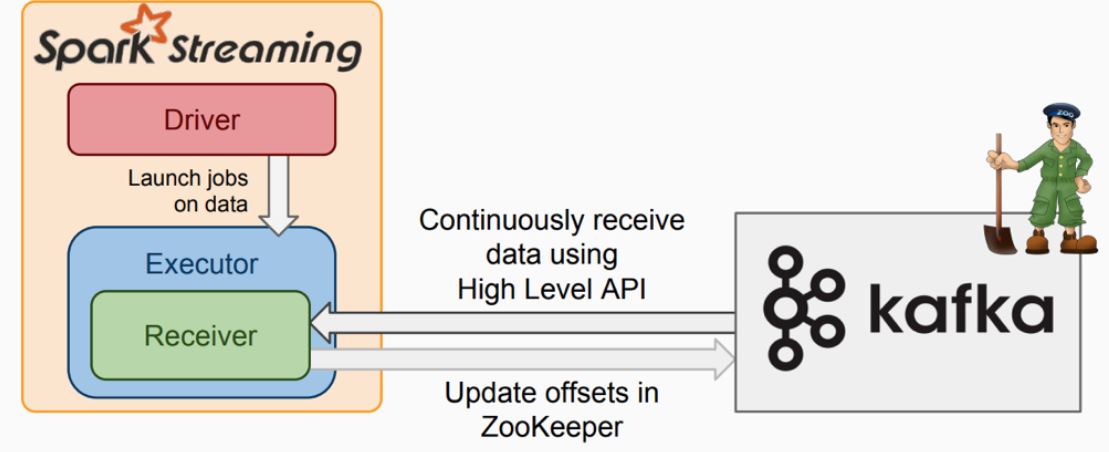
1 Spark Streaming读取Kafka的两种模式 Spark Streaming消费Kafka的数据有两种模式:Receiver和Direct模式,学习时候重点关注下Direct即可,因为在最新读取方式中已经不支持Receiver。 1.1 Receiver模式 在Spark 1.3之前,Spark Streaming消费Kafka中的数据采用基于Kafka高级消费API实现的Recei...
冒泡排序,及改进方式,性能优化400%>>>附图解加源码
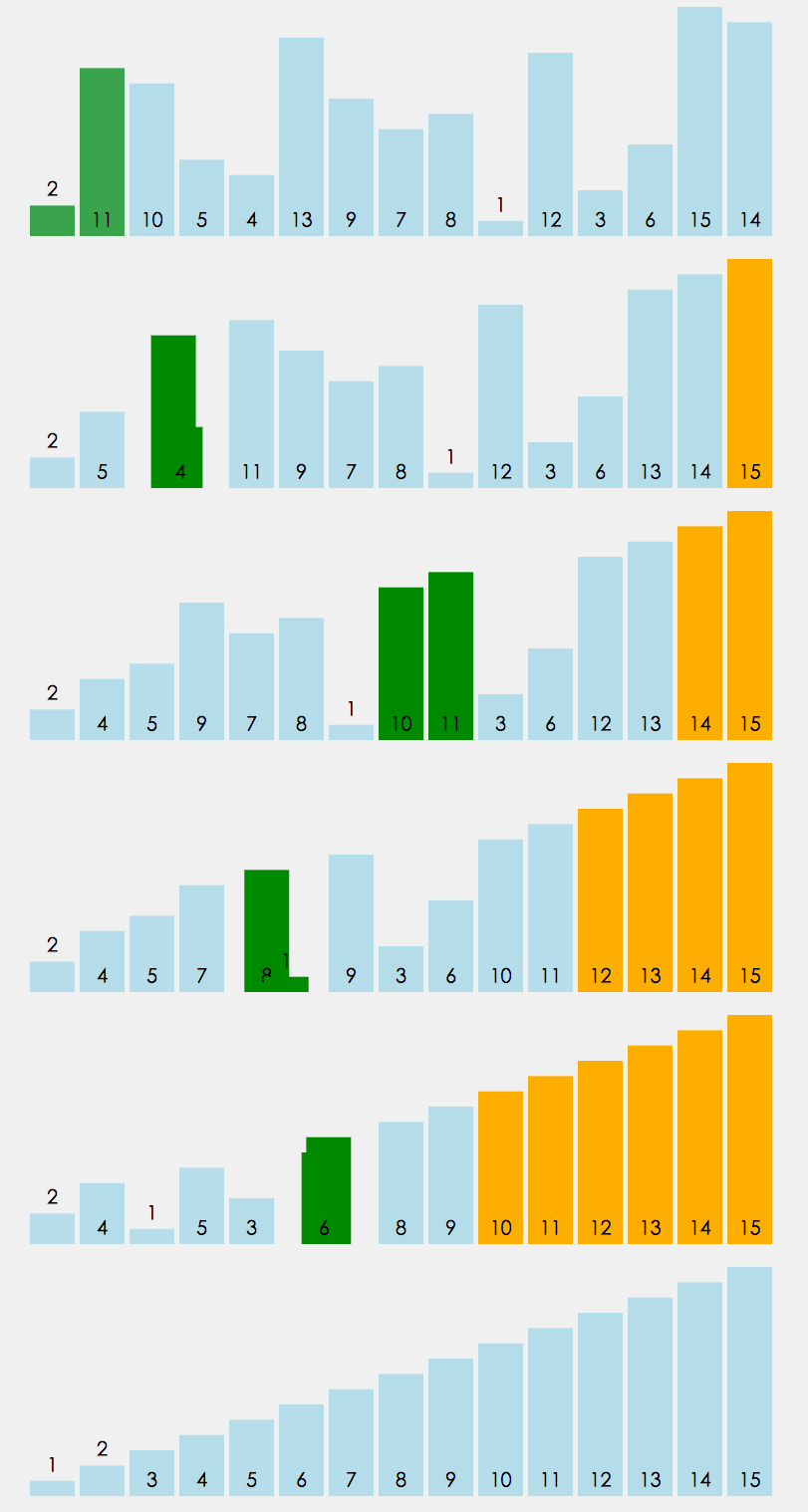
首先源码附上,源码中带有注释,看不懂没关系,源码后面附带图解,最后附上代码效率提升图 源码如下: 方案一:其实实现很简单,两层循环,每次内层迭代出最大的一个值,将其放入数组最后一个位置,外层循环的末端便往前移一位。其原理如下图 方案一代码块: 方案二:优化改进 仔细观察上面的图,我们不难发现当迭代到图下这样的情况时,其实已经全排序好了,但是我们还是需要对它进行1,2,3,4,5,6的迭代,这些情况...
猜你喜欢
css3常用选择器
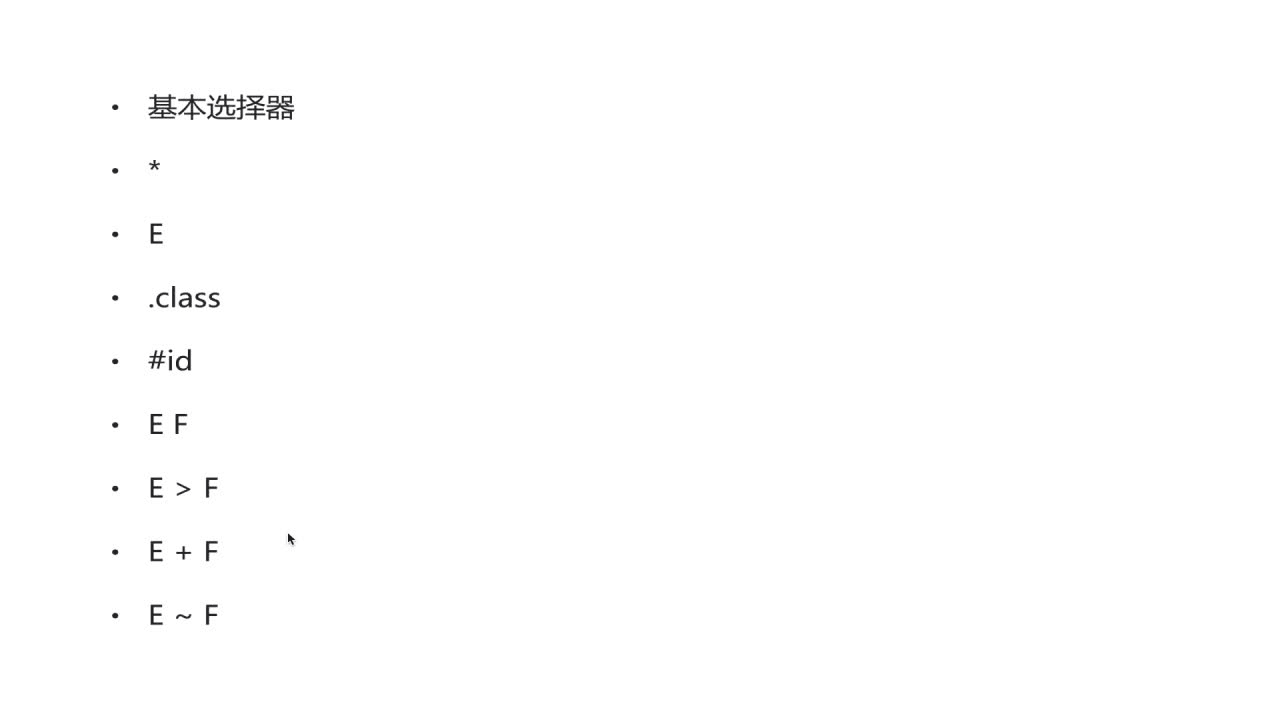
先介绍一下基本选择器,如下几种 *:通配符。选择页面的所有元素 E:元素选择器。对页面的一些元素进行选择,如p,div,li等 .class:类选择器 #id:id选择器。一个Id在一个页面中只能选择,这是和类选择器的区别 E F:后代选择器。如ul li。选中ul下的li E>F:子元素选择器。如下,可以用 h1 > strong {color:red;}使h1的子元素strong变...
python is not set from command line or npm configuration
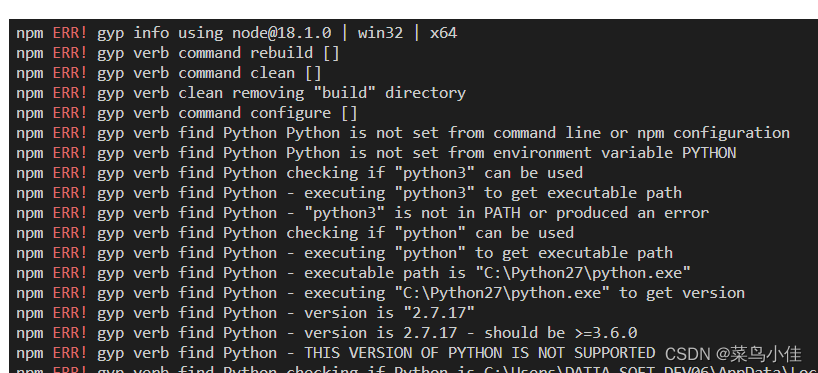
问题 猜测原因 python版本冲突 解决方案 去官网找到最新版本python 点击下载,注意记住你下载的目录,下载好以后,打开这个目录下的文件夹,Python310, 整个文件夹复制一下 在项目里运行npm config list --json 找到python的路径 我的是 C:\\Python27\\python.exe 说明项目里用的还是py...
Java8 Stream流操作
前言 我们常常需要将一个容器转化成另一个容器,或是对这个容器中的数据进行批量处理,这时使用Stream流可以大大减少我们的工作量。 1 Stream概述 Java 8 是一个非常成功的版本,这个版本新增的Stream,配合同版本出现的 Lambda ,给我们操作集合(Collection)提供了极大的便利。 那么什么是Stream? Stream将要处理的元素集合看作一种流,在流的过程中,借助St...
带你玩转Visual Studio——带你跳出坑爹的Runtime Library坑
在Windows下进行C++的开发,不可避免的要与Windows的底层库进行交互,然而VS下的一项设置MT、MTd、MD和MDd却经常让人搞迷糊,相信不少人都被他坑过,特别是你工程使用了很多第三库的时候,及容易出现各种链接问题。看一下下面这个错误提示: LIBCMT.lib(_file.obj) : error LNK2005: ___initstdio already defined...

git 设置 gitignore 忽略 __pycache__
清除git缓存中的pycache 直接删掉硬盘上的文件 如果我想保留硬盘上的这个文件,而只删除版本管理中的文件,就需要加入--cached参数。 切换分支出现问题 尽管我已经删除了__pycache__,硬盘也没有了,但是切换分支的时候依然是会提示本地重写的情况。 提示:需要我在切换分支之前,提交一次更新。 提交了更新之后,再来尝试切换分支,如下: 成功了,说明当做了任何变更之后,切换分支前需要执...
