RESTful HTTP服务的命令行REPL
标签: python docker java linux 大数据
My that's a lot of acronyms. REPL means "Read Evaluate Print Loop." You know how you can run "python" and then just type 2+2 and get answer? That's a type of REPL.
我的缩写很多。 REPL的意思是“读取评估打印循环”。 您知道如何运行“ python”,然后键入2 + 2并获得答案吗? 那是REPL的一种。
The ASP.NET Core team is building a REPL that lets you explore and interact with your RESTful services. Ideally your services will have Swagger/OpenAPI available that describes the service. Right now this Http-REPL is just being developed and they're aiming to release it as a .NET Core Global Tool in .NET Core 2.2.
ASP.NET Core团队正在构建REPL,使您可以探索RESTful服务并与之交互。 理想情况下,您的服务应具有描述该服务的Swagger / OpenAPI 。 目前,此Http-REPL刚刚被开发,他们的目标是将其作为.NET Core 2.2中的.NET Core全局工具发布。
You can install global tools like this:
您可以这样安装全局工具:
dotnet tool install -g nyancat
Then you can run "nyancat." Get a list of installed tools like this:
然后,您可以运行“ nyancat”。 获取以下已安装工具的列表:
C:\Users\scott> dotnet tool list -g
Package Id                 Version                   Commands
--------------------------------------------------------------------
altcover.global            3.5.560                   altcover
dotnet-depends             0.1.0                     dotnet-depends
dotnet-httprepl            2.2.0-preview3-35304      dotnet-httprepl
dotnet-outdated            2.0.0                     dotnet-outdated
dotnet-search              1.0.0                     dotnet-search
dotnet-serve               1.0.0                     dotnet-serve
git-status-cli             1.0.0                     git-status
github-issues-cli          1.0.0                     ghi
nukeeper                   0.7.2                     NuKeeper
nyancat                    1.0.0                     nyancat
project2015to2017.cli      1.8.1                     csproj-to-2017
For the HTTP-REPL, since it's not yet released you have to point the Tool Feed to a daily build location, so do this:
对于HTTP-REPL,由于尚未发布,因此您必须将工具Feed指向每日构建位置,因此请执行以下操作:
dotnet tool install -g --version 2.2.0-* --add-source https://dotnet.myget.org/F/dotnet-core/api/v3/index.json dotnet-httprepl
Then run it with "dotnet httprepl." I'd like another name? What do you think? RESTy? POSTr? API Test? API View?
然后使用“ dotnet httprepl”运行它。 我想要别的名字吗? 你怎么看? 休息吗海报? API测试? API视图?
Here's an example run where I start up a Web API.
这是我启动Web API的示例运行。
C:\SwaggerApp> dotnet httprepl
(Disconnected)~ set base http://localhost:65369
Using swagger metadata from http://localhost:65369/swagger/v1/swagger.json

http://localhost:65369/~ dir
.        []
People   [get|post]
Values   [get|post]

http://localhost:65369/~ cd People
/People    [get|post]

http://localhost:65369/People~ dir
.      [get|post]
..     []
{id}   [get]

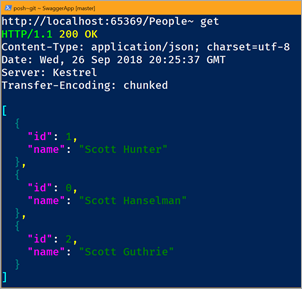
http://localhost:65369/People~ get
HTTP/1.1 200 OK
Content-Type: application/json; charset=utf-8
Date: Wed, 26 Sep 2018 20:25:37 GMT
Server: Kestrel
Transfer-Encoding: chunked

[
  {
    "id": 1,
    "name": "Scott Hunter"
  },
  {
    "id": 0,
    "name": "Scott Hanselman"
  },
  {
    "id": 2,
    "name": "Scott Guthrie"
  }
]
Take a moment and read that. It can be a little confusing. It's not HTTPie, it's not Curl, but it's also not PostMan. it's something that you run and stay running if you're a command line person and enjoy that space. It's as if you "cd (change directory)" and "mount" a disk into your Web API.
花一点时间阅读。 可能会有些混乱。 它不是HTTPie ,不是Curl,但它也不是PostMan。 如果您是命令行用户并且喜欢这个空间,那么您可以运行并保持运行。 就像您将cd(更改目录)并将磁盘“装入” Web API一样。
You can use all the HTTP Verbs, and when POSTing you can set a default text editor and it will launch the editor with the JSON written for you! Give it a try!
您可以使用所有HTTP动词,并且在POST时可以设置默认的文本编辑器,它将使用为您编写的JSON启动编辑器! 试一试!
A few gotchas/known issues:
一些陷阱/已知问题:
- You'll want to set a default Content-Type Header for your session. I think this should be default. 您需要为会话设置默认的Content-Type标头。 我认为这应该是默认设置。
set header Content-Type application/json
设置标头Content-Type application / json
- If the HTTP REPL doesn't automatically detect your Swagger/OpenAPI endpoint, you'll need to set it manually: 如果HTTP REPL无法自动检测到您的Swagger / OpenAPI端点,则需要手动进行设置:
set base https://yourapi/api/v1/
设置基础https:// yourapi / api / v1 /
set swagger https://yourapi/swagger.json
设置摇摇欲坠https://yourapi/swagger.json
- I haven't figure out how to get it to use VS Code as its default editor. Likely because "code.exe" isn't a thing. (It uses a batch .cmd file, which the HTTP REPL would need to special case). For now, use an editor that's an EXE and point the HTTP REPL like this: 我还没有弄清楚如何使用VS Code作为其默认编辑器。 可能是因为“ code.exe”不是问题。 (它使用一个批处理.cmd文件,HTTP REPL会在特殊情况下需要使用该文件)。 现在,使用作为EXE的编辑器,并指向HTTP REPL,如下所示:
pref set editor.command.default 'c:\notepad2.exe'
预设置editor.command.default'c:\ notepad2.exe'
I'm really enjoy this idea. I'm curious how you find it and how you'd see it being used. Sound off in the comments.
我真的很喜欢这个主意。 我很好奇您如何找到它以及如何使用它。 在评论中听起来不错。
Sponsor: Rider 2018.2 is here! Publishing to IIS, Docker support in the debugger, built-in spell checking, MacBook Touch Bar support, full C# 7.3 support, advanced Unity support, and more.
赞助商:骑士2018.2在这里! 发布到IIS,调试器中的Docker支持,内置拼写检查,MacBook Touch Bar支持,完整的C#7.3支持,高级Unity支持等等。
关于斯科特 (About Scott)
Scott Hanselman is a former professor, former Chief Architect in finance, now speaker, consultant, father, diabetic, and Microsoft employee. He is a failed stand-up comic, a cornrower, and a book author.
斯科特·汉塞尔曼(Scott Hanselman)是前教授,前金融首席架构师,现在是演讲者,顾问,父亲,糖尿病患者和Microsoft员工。 他是一位失败的单口相声漫画家,一个玉米种植者和一本书的作者。



翻译自: https://www.hanselman.com/blog/a-commandline-repl-for-restful-http-services
智能推荐

RESTful 规范的学习
前段时间实习公司前后端交互是使用RESTful api。所以也借此机会好好了解下。 以下就写写我的理解: RESTful英文名Representational State Transfer。他是一种软件架构风格、设计风格,而不是标准,只是提供了一组设计原则和约束条件。它主要用于客户端和服务器交互类的软件。基于这个风格设计的软件可以更简洁,更有层次,更易于实现缓存等机制。 因此:只要满足一些条件就能...

Gin 的 Restful 路由
在Mac上安装 Go 由于我的环境是Mac ,直接下载 Pkg ,win 和 linux 下载地址都在这里 。Go安装包下载 安装 Gin 包 go get gopkg.in/gin-gonic/gin.v1 Gin 的 http 路由用例...
restFul的趣味理解
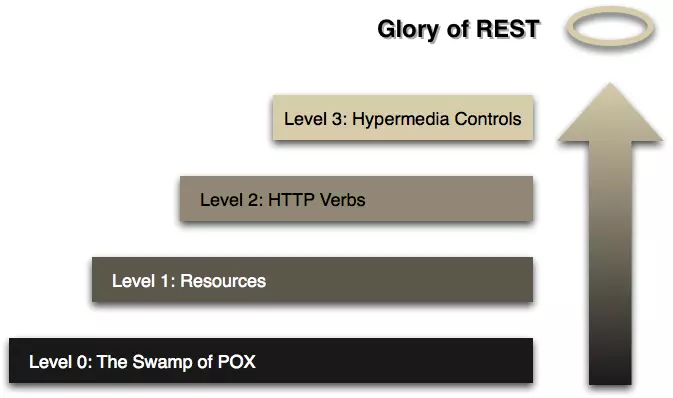
Level0 面向前台 这个字符串代表我们需要点单一杯拿铁。 接着前台返回给我们: 这个返回结果,代表您的定单编号是:123456,等下叫号取参。 突然想起自己有会员卡,所以又向前台发出一个问题: 查询会员卡余额,会员卡号是:88886666 查询结果返回来: 没成想自己是个屌丝,所有的卡中存款余额都是0,包括口袋,这可咋整,付不起拿铁了~ 接着就向前台发送请求 请删除这个定单,定单号为:1234...
restful风格的API
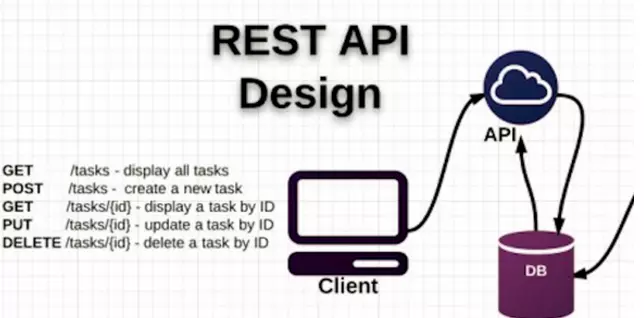
restful风格的API 要说RESTful首先来说说REST – REpresentational State Transfer (表述性状态传递) REST – REpresentational State Transfe 表述性状态转移是一组架构约束条件和原则。满足这些约束条件和原则的应用程序或设计就是RESTful。需要注意的是,REST是设计风格而不是标准。 表...
猜你喜欢
Elasticsearch的RESTful API
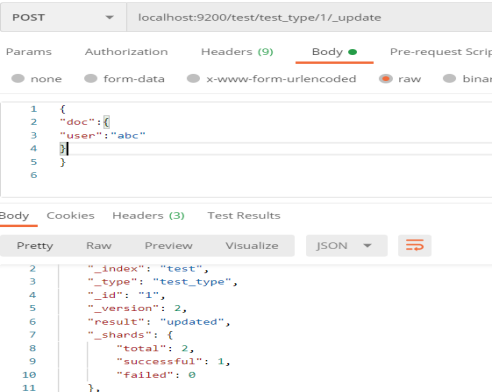
目录 前言 curl命令 Elasticsearch的RESTful API 结尾语 前言 我们操作Elasticsearch 是通过它提供的REST API来进行的,我们可以用web客户端(POST MAN等)或者curl命令来与Elasticsearch 进行交互 Elasticsearch 的REST请求和响应的内容基本都是JSON格式的 官方的API文档地址:https://www.ela...

CORDIC arithmetic
传统CORDIC算法code Verilog代码: 时钟为50Mhz; 输出设置均设置为有符号数,主要是因为计算CORDIC算法时,需要判断Z通道的符号,来得到迭代过程中旋转方向。 然后根据缩放因子和arctan 2^-n 的预定义并乘以2^16 来进行后续计算,根据迭代方程写出代码;最后将(0度到90度)中正弦值与余弦值来扩大至(0度至360度)的正弦值与余弦值。 编写的tb文件如下: 最终使用...
dubbo源码解析-线程通讯原理
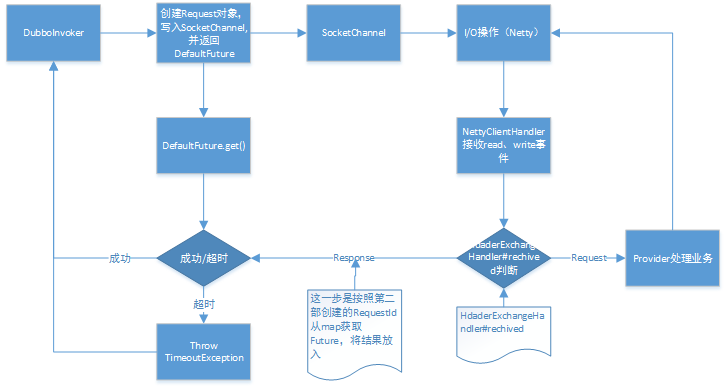
本来想通过Debug从头屡,发现意义不大,还是写点主通讯流程吧 本文基于JDK1.8;dubbo2.7.5 线程通讯原理 解释总体流程: DubboInvoker#doInvoker(Invocation)发起request,进入HeaderExchangeChannel 初始化Request对象(Dubbo自己封装的),初始化DefaultFuture将Request、channel放入,并记录...

使用Intellij Idea+Gradle 搭建Java 本地开发环境
Java 本地开发环境搭建 项目搭建采用技术栈为:Spring+Spring MVC+Hibernate+Jsp+Gradle+tomcat+mysql5.6 搭建环境文档目录结构说明: 使用Intellj Idea 搭建项目过程详解 项目各配置文件讲解及部署 各层包功能讲解&项目搭建完毕最终效果演示图 项目中重要代码讲解 5.配置tomcat 运行环境 6.webapp文件夹下分层详解 ...
