SpringMVC+Mybatis基础知识和配置
SpringMVC和Mybatis简单的记录一下,因为现在有比较新的SpringBoot和Mybatis plus简化了很多步骤。
SpringMVC
使用
- 创建maven项目,pom.xml
<dependencies>

    <dependency>
        <groupId>org.springframework</groupId>
        <artifactId>spring-webmvc</artifactId>
        <version>5.0.11.RELEASE</version>
    </dependency>
</dependencies>
- 在 web.xml 中配置 DispatcherServlet
<!DOCTYPE web-app PUBLIC
 "-//Sun Microsystems, Inc.//DTD Web Application 2.3//EN"
 "http://java.sun.com/dtd/web-app_2_3.dtd" >
<web-app>
  <display-name>Archetype Created Web Application</display-name>

  <servlet>
    <servlet-name>dispatcherServlet</servlet-name>
    <servlet-class>org.springframework.web.servlet.DispatcherServlet</servlet-class>
    <init-param>
      <param-name>contextConfigLocation</param-name>
      <param-value>classpath:springmvc.xml</param-value>
    </init-param>
  </servlet>

  <servlet-mapping>
    <servlet-name>dispatcherServlet</servlet-name>
    <url-pattern>/</url-pattern>
  </servlet-mapping>
</web-app>
- springmvc.xml
<?xml version="1.0" encoding="UTF-8"?>
<beans xmlns="http://www.springframework.org/schema/beans"
       xmlns:xsi="http://www.w3.org/2001/XMLSchema-instance"
       xmlns:context="http://www.springframework.org/schema/context"
       xmlns:mvc="http://www.springframework.org/schema/mvc"
       xsi:schemaLocation="http://www.springframework.org/schema/beans http://www.springframework.org/schema/beans/spring-beans.xsd http://www.springframework.org/schema/context http://www.springframework.org/schema/context/spring-context.xsd
       http://www.springframework.org/schema/mvc
       http://www.springframework.org/schema/mvc/spring-mvc-3.2.xsd">

    <!-- 自动扫描 -->
    <context:component-scan base-package="com.southwind"></context:component-scan>

    <!-- 配置视图解析器 -->
    <bean class="org.springframework.web.servlet.view.InternalResourceViewResolver">
        <property name="prefix" value="/"></property>
        <property name="suffix" value=".jsp"></property>
    </bean>

</beans>
- 创建 Handler
package com.southwind.controller;

import org.springframework.stereotype.Controller;
import org.springframework.web.bind.annotation.RequestMapping;

@Controller
public class HelloHandler {
    @RequestMapping("/index")
    public String index(){
        System.out.println("执行了index...");
        return "index";
    }
}
Spring MVC REST
REST:Representational State Transfer,资源表现层状态转换,是目前比较主流的一种互联网软件架构,它结构清晰、标准规范、易于理解、便于扩展。
- 资源(Resource)
网络上的一个实体,或者说网络中存在的一个具体信息,一段文本、一张图片、一首歌曲、一段视频等等,总之就是一个具体的存在。可以用一个 URI(统一资源定位符)指向它,每个资源都有对应的一个特定的 URI,要获取该资源时,只需要访问对应的 URI 即可。
- 表现层(Representation)
资源具体呈现出来的形式,比如文本可以用 txt 格式表示,也可以用 HTML、XML、JSON等格式来表示。
- 状态转换(State Transfer)
客户端如果希望操作服务器中的某个资源,就需要通过某种方式让服务端发生状态转换,而这种转换是建立在表现层之上的,所有叫做"表现层状态转换"。
特点
- URL 更加简洁。
- 有利于不同系统之间的资源共享,只需要遵守一定的规范,不需要进行其他配置即可实现资源共享。
如何使用
REST 具体操作就是 HTTP 协议中四个表示操作方式的动词分别对应 CRUD 基本操作。
GET 用来表示获取资源。
POST 用来表示新建资源。
PUT 用来表示修改资源。
DELETE 用来表示删除资源。
Handler`
import entity.Student;
import entity.User;
import repository.StudentRepository;
import org.springframework.beans.factory.annotation.Autowired;
import org.springframework.stereotype.Repository;
import org.springframework.web.bind.annotation.*;

import javax.servlet.http.HttpServletResponse;
import java.util.Collection;

@RestController
@RequestMapping("/rest")
public class RESTHandeler {

    @Autowired
    private StudentRepository studentRepository;

    @GetMapping("/findAll")
    public Collection<Student> findAll(HttpServletResponse response){
        response.setContentType("text/json;charset=UTF-8");
        return studentRepository.findAll();
    }

    @GetMapping("/findById/{id}")
    public Student findById(@PathVariable("id") long id){
        return studentRepository.findById(id);
    }

    @PostMapping("/save")
    public void save(@RequestBody Student student){
        studentRepository.saveOrUpdate(student);
    }

    @PutMapping("/update")
    public void update(@RequestBody Student student){
        studentRepository.saveOrUpdate(student);
    }

    @DeleteMapping("/deleteById/{id}")
    public void deleteById(@PathVariable("id") long id){
        studentRepository.deleteById(id);
    }

}
StudentRepository
package repository;

import entity.Student;

import java.util.Collection;

public interface StudentRepository {
    public Collection<Student> findAll();
    public Student findById(long id);
    public void saveOrUpdate(Student student);
    public void deleteById(long id);
}
StudentRepositoryImpl
import entity.Student;
import repository.StudentRepository;
import org.springframework.stereotype.Repository;

import java.util.Collection;
import java.util.HashMap;
import java.util.Map;

@Repository
public class StudentRepositoryImpl implements StudentRepository {

    private static Map<Long,Student> studentMap;

    static{
        studentMap = new HashMap<>();
        studentMap.put(1L,new Student(1L,"张三",22));
        studentMap.put(2L,new Student(2L,"李四",23));
        studentMap.put(3L,new Student(3L,"王五",24));
    }

    @Override
    public Collection<Student> findAll() {
        return studentMap.values();
    }

    @Override
    public Student findById(long id) {
        return studentMap.get(id);
    }

    @Override
    public void saveOrUpdate(Student student) {
        studentMap.put(student.getId(),student);
    }

    @Override
    public void deleteById(long id) {
        studentMap.remove(id);
    }
}
Mybatis
MyBatis
ORMapping: Object Relationship Mapping 对象关系映射
对象指⾯向对象
关系指关系型数据库
Java 到 MySQL 的映射,开发者可以以⾯向对象的思想来管理数据库。
如何使⽤
新建 Maven ⼯程,pom.xml
<dependencies>
 <dependency>
 <groupId>org.mybatis</groupId>
 <artifactId>mybatis</artifactId>
 <version>3.4.5</version>
 </dependency>
 <dependency>
 <groupId>mysql</groupId>
 <artifactId>mysql-connector-java</artifactId>
 <version>8.0.11</version>
 </dependency>
 <dependency>
 <groupId>org.projectlombok</groupId>
 <artifactId>lombok</artifactId>
 <version>1.18.6</version>
 <scope>provided</scope>
 </dependency>
</dependencies> <build>
 <resources>
 <resource>
 <directory>src/main/java</directory>
 <includes>
 <include>**/*.xml</include>
 </includes>
 </resource>
 </resources>
</build>
新建数据表
use mybatis;
create table t_account(
 id int primary key auto_increment,
 username varchar(11),
 password varchar(11),
 age int
)
新建数据表对应的实体类 Account
package entity;
import lombok.Data;
@Data
public class Account {
 private long id;
 private String username;
 private String password;
 private int age; }
创建 MyBatis 的配置⽂件 config.xml,⽂件名可⾃定义
<?xml version="1.0" encoding="UTF-8"?>
<!DOCTYPE configuration PUBLIC "-//mybatis.org//DTD Config 3.0//EN"
"http://mybatis.org/dtd/mybatis-3-config.dtd">
<configuration>
<!-- 配置MyBatis运⾏环境 -->
<environments default="development">
<environment id="development">
<!-- 配置JDBC事务管理 -->
<transactionManager type="JDBC"></transactionManager>
<!-- POOLED配置JDBC数据源连接池 -->
<dataSource type="POOLED">
<property name="driver" value="com.mysql.cj.jdbc.Driver">
</property>
<property name="url"
value="jdbc:mysql://localhost:3306/mybatis?
useUnicode=true&characterEncoding=UTF-8"></property>
<property name="username" value="root"></property>
<property name="password" value="root"></property>
</dataSource>
</environment>
</environments>
</configuration>
通过 Mapper 代理实现⾃定义接⼝
⾃定义接⼝,定义相关业务⽅法。
编写与⽅法相对应的 Mapper.xml。
1、⾃定义接⼝
package repository;
import entity.Account;
import java.util.List;
public interface AccountRepository {
 public int save(Account account);
 public int update(Account account);
 public int deleteById(long id);
 public List<Account> findAll();
 public Account findById(long id);
}
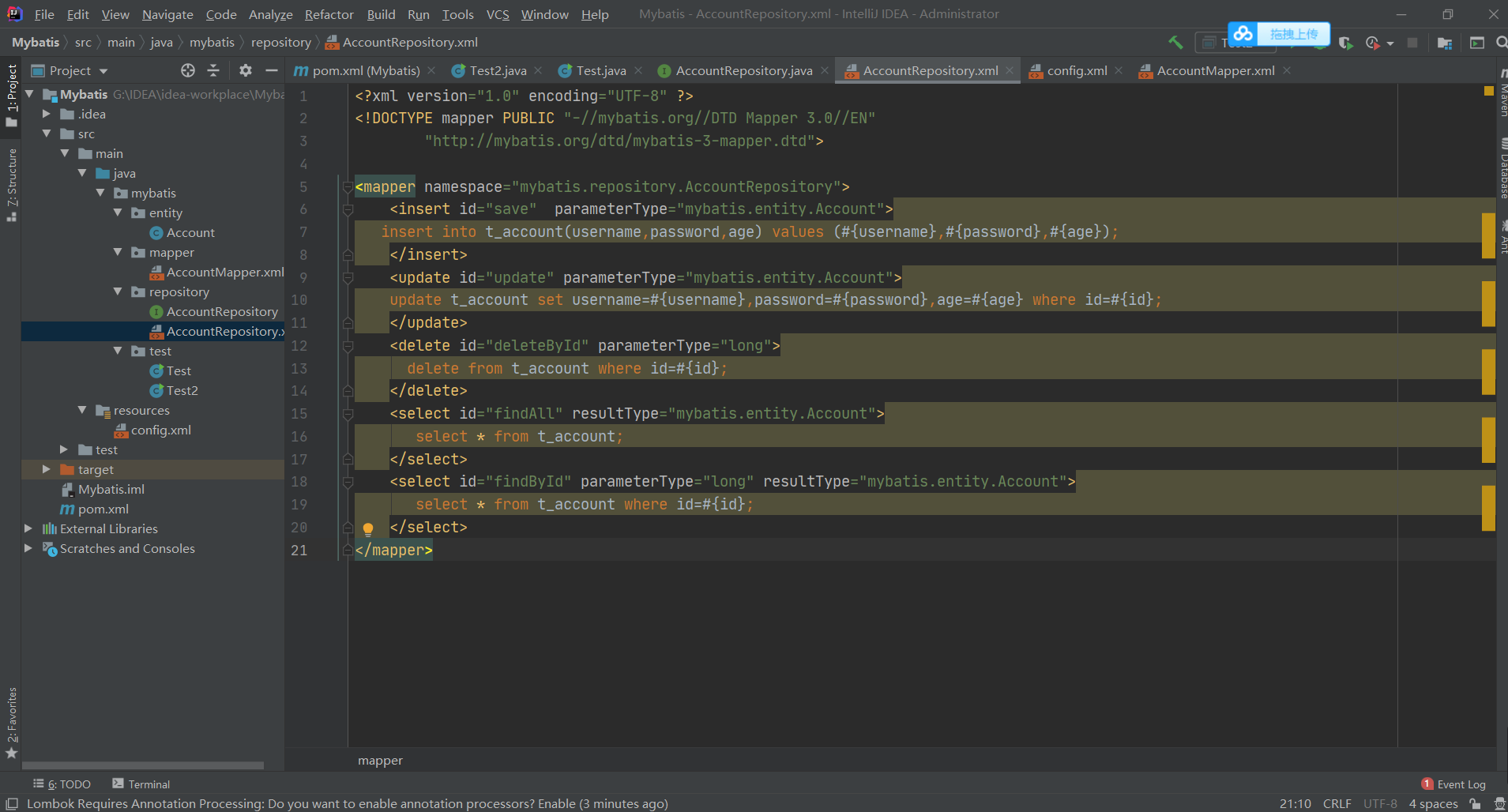
2、创建接⼝对应的 Mapper.xml,定义接⼝⽅法对应的 SQL 语句。
statement 标签可根据 SQL 执⾏的业务选择 insert、delete、update、select。
MyBatis 框架会根据规则⾃动创建接⼝实现类的代理对象。
规则:
Mapper.xml 中 namespace 为接⼝的全类名。
Mapper.xml 中 statement 的 id 为接⼝中对应的⽅法名。
Mapper.xml 中 statement 的 parameterType 和接⼝中对应⽅法的参数类型⼀致。
Mapper.xml 中 statement 的 resultType 和接⼝中对应⽅法的返回值类型⼀致。
<?xml version="1.0" encoding="UTF-8" ?>
<!DOCTYPE mapper PUBLIC "-//mybatis.org//DTD Mapper 3.0//EN"
        "http://mybatis.org/dtd/mybatis-3-mapper.dtd">

<mapper namespace="mybatis.repository.AccountRepository">
    <insert id="save"  parameterType="mybatis.entity.Account">
   insert into t_account(username,password,age) values (#{username},#{password},#{age});
    </insert>
    <update id="update" parameterType="mybatis.entity.Account">
    update t_account set username=#{username},password=#{password},age=#{age} where id=#{id};
    </update>
    <delete id="deleteById" parameterType="long">
      delete from t_account where id=#{id};
    </delete>
    <select id="findAll" resultType="mybatis.entity.Account">
       select * from t_account;
    </select>
    <select id="findById" parameterType="long" resultType="mybatis.entity.Account">
       select * from t_account where id=#{id};
    </select>
</mapper>
3、在 config.xml 中注册 AccountRepository.xml
<!-- 注册AccountMapper.xml -->
    <mappers>
        <mapper resource="mybatis/mapper/AccountMapper.xml"></mapper>
        <mapper resource="mybatis/repository/AccountRepository.xml"></mapper>
    </mappers>
4、调⽤接⼝的代理对象完成相关的业务操作
package mybatis.test;

import mybatis.entity.Account;
import mybatis.repository.AccountRepository;
import org.apache.ibatis.session.SqlSession;
import org.apache.ibatis.session.SqlSessionFactory;
import org.apache.ibatis.session.SqlSessionFactoryBuilder;

import java.io.InputStream;
import java.util.List;

public class Test2 {
 public static void main(String[] args) {
 InputStream inputStream =
Test.class.getClassLoader().getResourceAsStream("config.xml");
 SqlSessionFactoryBuilder sqlSessionFactoryBuilder = new
SqlSessionFactoryBuilder();
 SqlSessionFactory sqlSessionFactory =
sqlSessionFactoryBuilder.build(inputStream);
 SqlSession sqlSession = sqlSessionFactory.openSession();
 //获取实现接⼝的代理对象
 AccountRepository accountRepository =
sqlSession.getMapper(AccountRepository.class);
 //添加对象
// Account account = new Account(3L,"王五","111111",24);
// int result = accountRepository.save(account);
// sqlSession.commit();
 //查询全部对象
// List<Account> list = accountRepository.findAll();
// for (Account account:list){
// System.out.println(account);
// }
// sqlSession.close();
 //通过id查询对象
// Account account = accountRepository.findById(3L);
// System.out.println(account);
// sqlSession.close();
 //修改对象
// Account account = accountRepository.findById(3L);
// account.setUsername("⼩明");
// account.setPassword("000");
// account.setAge(18);
// int result = accountRepository.update(account);
// sqlSession.commit();
// System.out.println(result);
// sqlSession.close();
 //通过id删除对象
 int result = accountRepository.deleteById(3L);
 System.out.println(result);
 sqlSession.commit();
 sqlSession.close();
 }
}
逆向⼯程
MyBatis 框架需要:实体类、⾃定义 Mapper 接⼝、Mapper.xml
传统的开发中上述的三个组件需要开发者⼿动创建,逆向⼯程可以帮助开发者来⾃动创建三个组件,减
轻开发者的⼯作量,提⾼⼯作效率。
如何使⽤
MyBatis Generator,简称 MBG,是⼀个专⻔为 MyBatis 框架开发者定制的代码⽣成器,可⾃动⽣成
MyBatis 框架所需的实体类、Mapper 接⼝、Mapper.xml,⽀持基本的 CRUD 操作,但是⼀些相对复
杂的 SQL 需要开发者⾃⼰来完成。
新建 Maven ⼯程,pom.xml
<dependencies>
 <dependency>
 <groupId>org.mybatis</groupId>
 <artifactId>mybatis</artifactId>
 <version>3.4.5</version>
 </dependency>
 <dependency>
 <groupId>mysql</groupId>
 <artifactId>mysql-connector-java</artifactId>
 <version>8.0.11</version>
 </dependency>
 <dependency>
 <groupId>org.mybatis.generator</groupId>
 <artifactId>mybatis-generator-core</artifactId>
 <version>1.3.2</version>
 </dependency>
</dependencies>
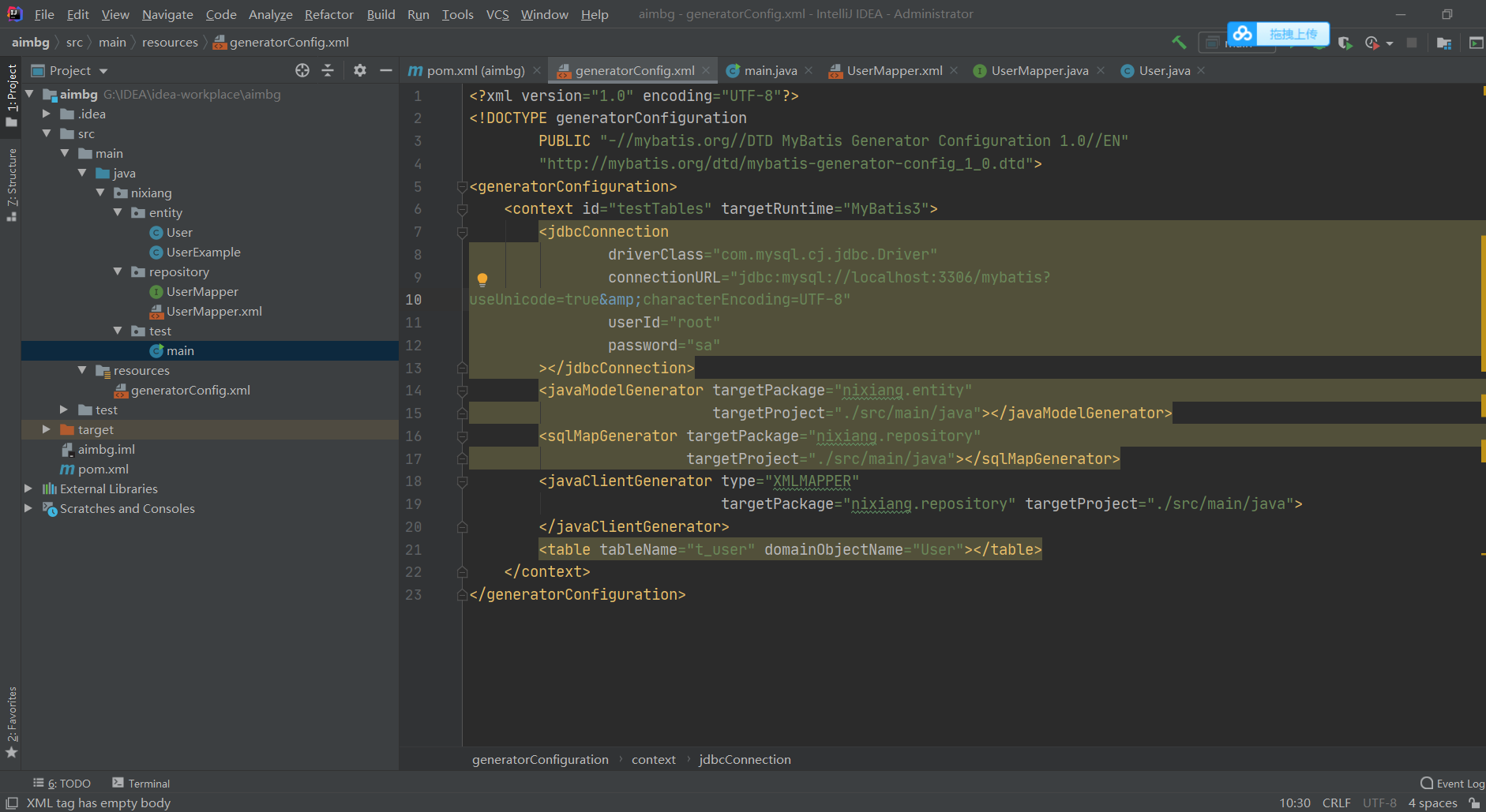
创建 MBG 配置⽂件 generatorConfig.xml
1、jdbcConnection 配置数据库连接信息。
2、javaModelGenerator 配置 JavaBean 的⽣成策略。
3、sqlMapGenerator 配置 SQL 映射⽂件⽣成策略。
4、javaClientGenerator 配置 Mapper 接⼝的⽣成策略。
5、table 配置⽬标数据表(tableName:表名,domainObjectName:JavaBean 类名)。
<?xml version="1.0" encoding="UTF-8"?>
<!DOCTYPE generatorConfiguration
PUBLIC "-//mybatis.org//DTD MyBatis Generator Configuration 1.0//EN"
"http://mybatis.org/dtd/mybatis-generator-config_1_0.dtd">
<generatorConfiguration>
<context id="testTables" targetRuntime="MyBatis3">
<jdbcConnection
driverClass="com.mysql.cj.jdbc.Driver"
connectionURL="jdbc:mysql://localhost:3306/mybatis?
useUnicode=true&characterEncoding=UTF-8"
userId="root"
password="sa"
></jdbcConnection>
<javaModelGenerator targetPackage="nixiang.entity"
targetProject="./src/main/java"></javaModelGenerator>
<sqlMapGenerator targetPackage="nixiang.repository"
targetProject="./src/main/java"></sqlMapGenerator>
<javaClientGenerator type="XMLMAPPER"
targetPackage="nixiang.repository" targetProject="./src/main/java">
</javaClientGenerator>
<table tableName="t_user" domainObjectName="User"></table>
</context>
</generatorConfiguration>
创建 Generator 执⾏类。
package nixiang.test;

import org.mybatis.generator.api.MyBatisGenerator;
import org.mybatis.generator.config.Configuration;
import org.mybatis.generator.config.xml.ConfigurationParser;
import org.mybatis.generator.exception.InvalidConfigurationException;
import org.mybatis.generator.exception.XMLParserException;
import org.mybatis.generator.internal.DefaultShellCallback;
import sun.applet.Main;

import java.io.File;
import java.io.IOException;
import java.sql.SQLException;
import java.util.ArrayList;
import java.util.List;

public class main {
    public static void main(String[] args) {
        List<String> warings = new ArrayList<String>();
        boolean overwrite = true;
        String genCig = "/generatorConfig.xml";
        File configFile = new File(Main.class.getResource(genCig).getFile());
        ConfigurationParser configurationParser = new
                ConfigurationParser(warings);
        Configuration configuration = null;
        try {
            configuration = configurationParser.parseConfiguration(configFile);
        } catch (IOException e) {
            e.printStackTrace();
        } catch (XMLParserException e) {
            e.printStackTrace();
        }
        DefaultShellCallback callback = new DefaultShellCallback(overwrite);
        MyBatisGenerator myBatisGenerator = null;
        try {
            myBatisGenerator = new
                    MyBatisGenerator(configuration,callback,warings);
        } catch (InvalidConfigurationException e) {
            e.printStackTrace();
        }
        try {
            myBatisGenerator.generate(null);
        } catch (SQLException e) {
            e.printStackTrace();
        } catch (IOException e) {
            e.printStackTrace();
        } catch (InterruptedException e) {
            e.printStackTrace();
        }
    }
}
智能推荐
数组和链表的基础知识
目录 简介 一、数组 二、链表 2.1 单向链表 2.1.1 单向链表的概念 2.2.2 单链表删除节点 2.1.3 单链表添加节点 2.2 双向链表 2.2.1 双向链表的概念 2.2.2 双链表删除节点 2.2.3 双链表添加节点 2.3 循环链表 2.4 循环双向链表的实现(Java实现) 三、总结:数组与链表的特点 简介 线性表是一种线性结构,它是具有相同类型的n(n&...
javaweb html和css基础知识
html格式化代码 cirl + shift + f html 一些标签 css (样式样式优先级) 行内样式 >内部样式 >外部样式 标签选择器的优先级 id选择器 >class选择器 >标签选择器 javascript js关键字——>function 声明函数使用function关键字,不需要指定返回值类型,形参也不需要指定类型 先声明,...
MySQL基础知识——管理和连接
点击上方SQL数据库开发,关注获取SQL**** SQL专栏 SQL基础知识汇总 SQL高级知识汇总 内容简介 今天主要给大家讲解MySQL的简单管理与连接 管理 查看MySQL运行状态 MySQL安装好之后,默认是处于启动状态,但是要如何确认它是否启动呢? 可以在运行界面输入命令:services.msc 进入服务窗口 在服务窗口,我们找到之前安装时配置的MySQL服务名:MySQL80 我们看...
爬虫基础知识和正则
动态UA 获取二进制数据 文件上传 维持会话 认证问题 乱码问题 查编码类型 正则表达式 ()代表分组 回车换行匹配 .*可以不加括号,此时加了,是因为他分组了。 贪婪模式是极多可能的匹配,所以此时,\d+可能只代表7,+表示匹配一次到多次 非贪婪模式 ,及可能少的匹配,此时代表 llo \加转义的字符 search 虽然可以全局匹配,但当出现相同内容是,它只匹配第一个。 两种转义方法 split...

2018andoid混淆打包遇到Execution failed for task ':app:transformClassesAndResourcesWithProguardForRelease'.
在正式打包中,加上了 然后打包过程中,build中就报出了 Execution failed for task ‘:app:transformClassesAndResourcesWithProguardForRelease’. 然后就goodle了一下,最简单有效的回复,就是在 proguard-rules.pro 文件中加入 -ignorewarnings 但是在我这可...
猜你喜欢
matlab与python的交互
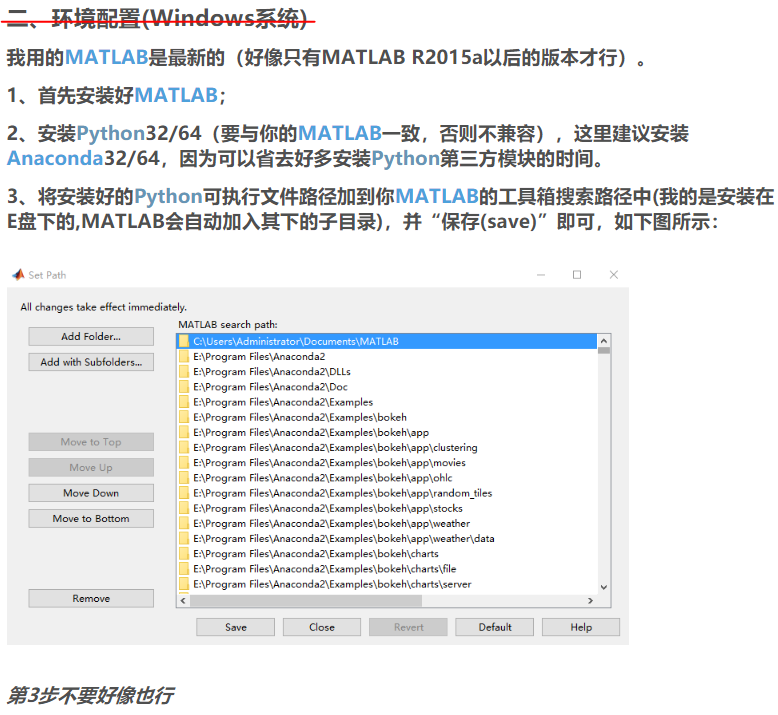
一、从matlab调用python 1、先给出官方链接 进入链接后点示例,内容更丰富一些。《Python 库 — 示例》 2、简单说一下环境配置(下面的图片内容来自https://blog.csdn.net/jnulzl/article/details/51170859) 3、添加python环境变量以加载模块 如果是将当前文件夹加入到python搜索路径,modpath='';即可。...
Java实现先序数组转换成后序数组
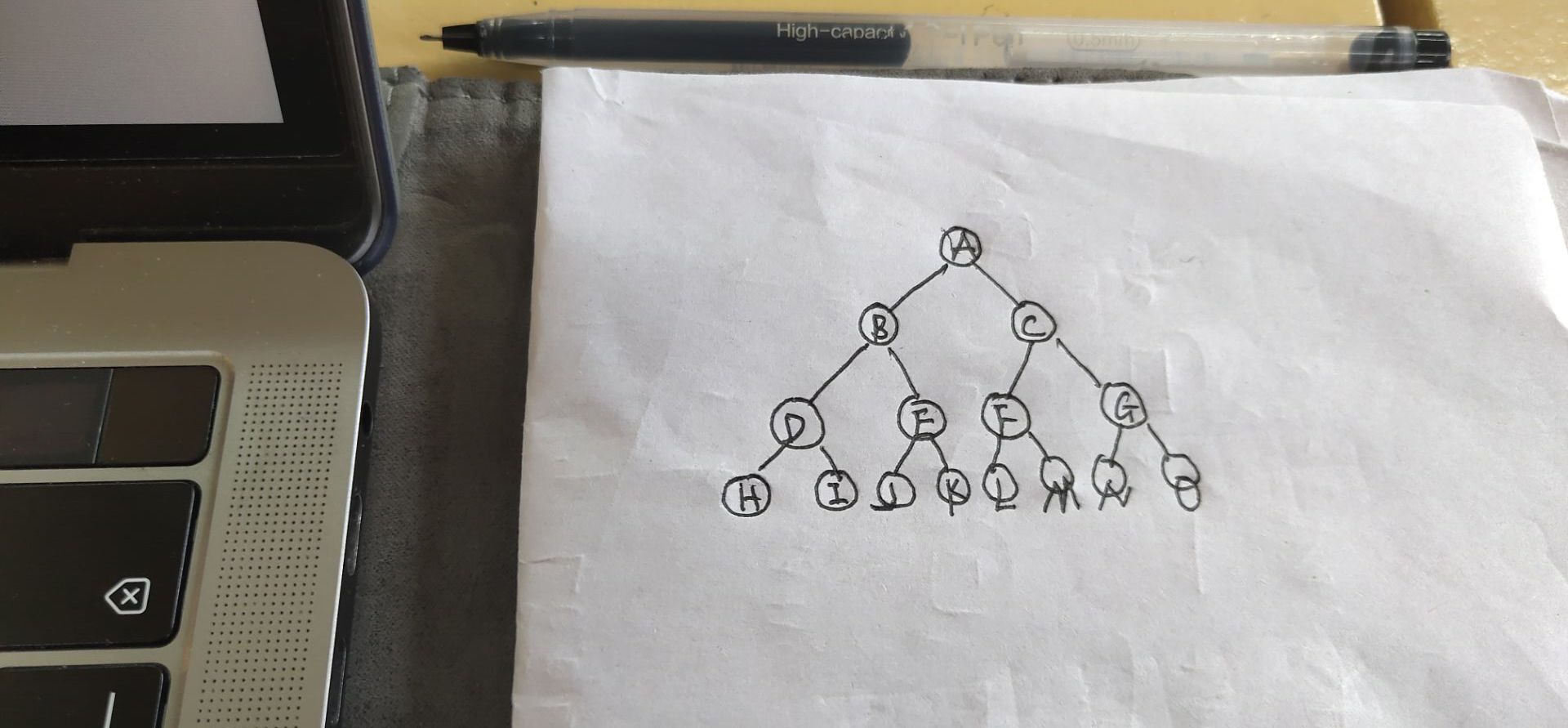
算法描述 满二叉树的先序序列存储在数组中,设计一个算法将其转换成后序遍历 满二叉树形状 先序和后序序列 先序序列:A B D H I E J K C F L M G N O 后序序列:H I D J K E B L M F N O G C A 算法思想 Transfer函数参数说明: pre就是先序序列数组,f1,l1分别是先序序列的第一个和最后一个元素; post就是后序序列数组,f2,l2分别...
markdown学习
欢迎随时骚扰:QQ为495470602 markdown学习 我们来学习一下markdown:什么是marjdown Markdown 是一种轻量级标记语言,创始人为约翰·格鲁伯。它允许人们“使用易读易写的纯文本格式编写文档,然后转换成有效的 XHTML 文档”。这种语言吸收了很多在电子邮件中已有的纯文本标记的特性。 优点:由于 Markdown 的轻量化、易...